> For the complete documentation index, see [llms.txt](https://docs.fastn.ai/llms.txt). Markdown versions of documentation pages are available by appending `.md` to page URLs; this page is available as [Markdown](https://docs.fastn.ai/reference/api.md).
# HTTP API
Calling workflows and unified endpoints over HTTP.
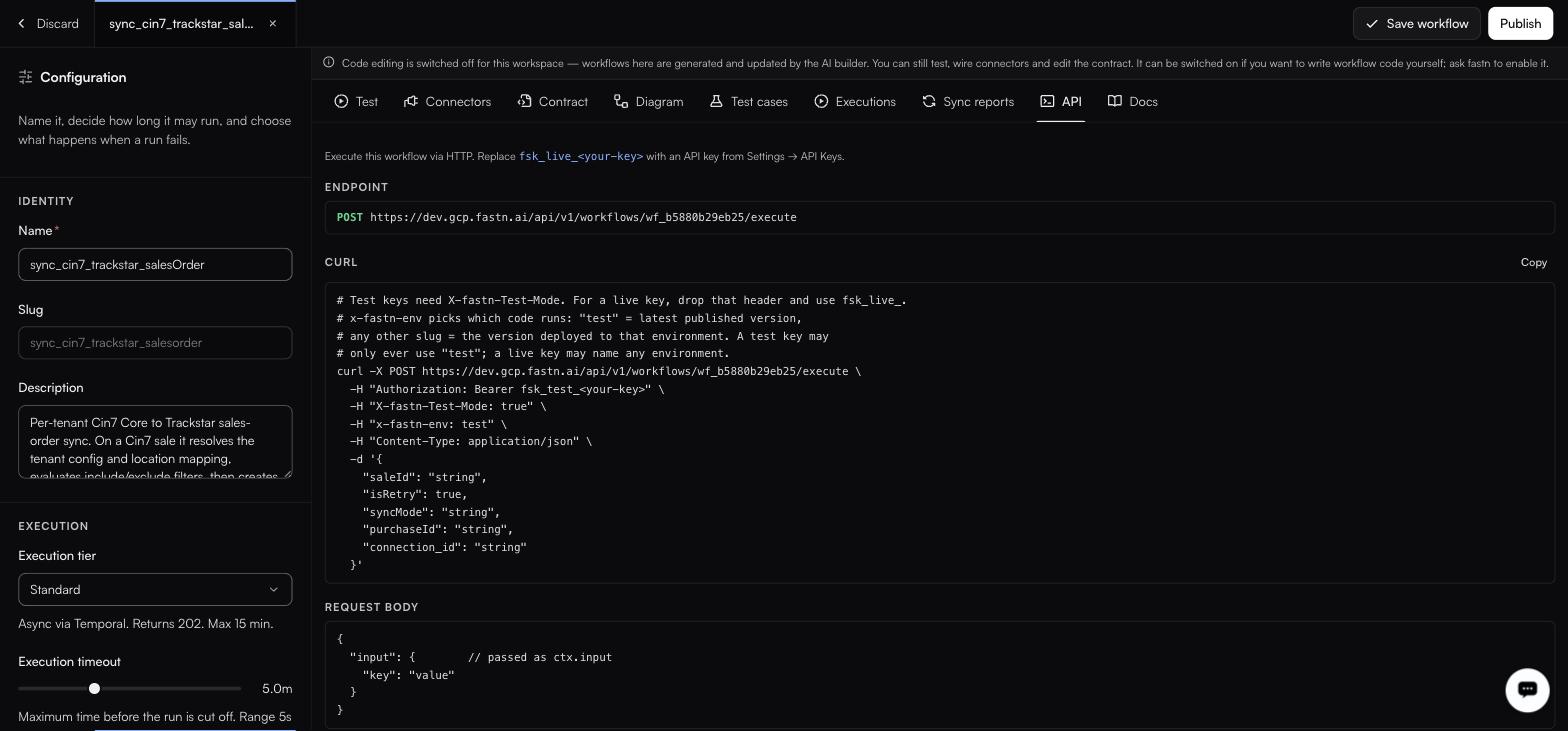
Every workflow's API tab shows its own endpoint and a copyable curl.
### Base URL
Production base URL: `https://api.fastn.dev`. Your workflow's **API** tab shows the URL for your workspace. Examples below use `YOUR_FASTN_HOST`.
***
## Authentication
Every request carries an API key as a bearer token.
```
Authorization: Bearer fsk_live_
```
Keys are created under [Settings → API keys](/manage/api-keys.md) and come in two modes.
| Header | Live key | Test key |
| ------------------- | -------------------- | ---------------------------------------------------- |
| `Authorization` | `Bearer fsk_live_…` | `Bearer fsk_test_…` |
| `X-fastn-Test-Mode` | Not needed | Must be `true`: **a test key is refused without it** |
| `x-fastn-env` | Any environment slug | Any environment slug |
The rule that is enforced is the test-key one: a test key without `X-fastn-Test-Mode: true` is rejected. Do not read that backwards into an assumption about what a live key may or may not send.
`x-fastn-env` picks which code runs:
* `test`: the workflow's latest published version.
* any other slug: the version deployed to that environment.
{% hint style="danger" %}
A test key is not a sandbox. It reaches the same live connections as a live key and causes the same real writes.
{% endhint %}
***
## Execute a workflow
```
POST /api/v1/workflows/{workflowId}/execute
```
The workflow id is shown on the workflow's API tab, in the form `wf_b5880b29eb25`.
```bash
curl -X POST https://YOUR_FASTN_HOST/api/v1/workflows/WORKFLOW_ID/execute \
-H "Authorization: Bearer fsk_test_" \
-H "X-fastn-Test-Mode: true" \
-H "x-fastn-env: test" \
-H "Content-Type: application/json" \
-d '{
"input": {
"saleId": "S-1024",
"isRetry": false,
"syncMode": "incremental"
}
}'
```
### Request body
```json
{
"input": {
"key": "value"
}
}
```
The `input` object is what arrives as `ctx.input`. Its shape comes from the workflow's input contract.
{% hint style="info" %}
Every workflow's **API** tab generates a ready-to-run curl filled in with that workflow's own host, id and contract fields. When the two differ, copy from there. It is generated from the deployment you are actually calling.
{% endhint %}
### Response: Instant tier
The workflow's return value comes back inline, synchronously, within the tier's 30-second ceiling. Its shape is the workflow's own **output contract**: read it on the Contract tab rather than from an example here, because it is different for every workflow.
### Response: Standard and Long tiers
`202 Accepted` with an execution id, in the form `exec_…`. The run continues in the background; the id is what identifies it afterwards in [Executions](/operate/executions.md), where each row expands to its input, output and per-step timings.
{% hint style="info" %}
There is no documented endpoint for polling an execution id. If your caller needs to know the outcome of a Standard or Long run, have the workflow call you back at the end rather than assuming you can poll for it.
{% endhint %}
***
## Scoping a call to a customer
fastn is multi-tenant: the same workflow serves all of your customers, and headers on the request are what say which one a call is for.
| Header | Carries |
| ----------------------------- | ----------------------------------------------------------- |
| `x-end-org-id` | The customer this call acts for. |
| `x-end-org-ref` | Your own reference for that customer. |
| `x-installation-id` | Which installation of the integration the call belongs to. |
| `x-fastn-connections` | The connections the run may use. |
| `x-fastn-installation-config` | The configuration values that installation was set up with. |
Inside the workflow these arrive on `ctx.headers`. See [Workflow runtime API](/reference/workflow-runtime.md). Exact value formats are on each workflow's own **Docs** tab, generated from the deployment you are calling; check there before you hard-code one.
***
## Unified endpoints
Where a [unified API](/build/unified-apis.md) covers an entity, call it directly rather than a specific connector.
```http
GET /api/v1/unified/crm/account?page_size=50
GET /api/v1/unified/crm/account/{recordId}
POST /api/v1/unified/crm/account
POST /api/v1/unified/crm/note
```
fastn routes to whichever provider the customer authorised. Each endpoint on the Unified APIs page has a **Copy curl** button with the correct headers filled in.
***
## Webhook endpoints
A [webhook trigger](/build/triggers.md) gives you a public URL. Whether callers must authenticate is set on the trigger:
| Authentication setting | Caller must send |
| -------------------------------- | -------------------------------- |
| **API Key (x-fastn-access-key)** | `x-fastn-access-key: ` |
| **None (public)** | Nothing |
***
## Embed tokens
Tokens that scope the widget to one customer. Mint them from your backend with your API key; never expose the API key to a browser.
### Mint a token
```
POST /api/v1/embed/token
```
| Header | Value |
| --------------- | ------------------ |
| `Authorization` | `Bearer ` |
| `x-org-id` | `` |
```json
{
"token": "emb_…",
"endOrgId": "…",
"role": "end_user",
"expiresIn": 28800
}
```
`expiresIn` is **28800 seconds: eight hours**. `endOrgId` is the customer the token is scoped to, and the returned role is always `end_user`.
Where the API key is pinned to specific customers, send `{"endOrgId": "…"}` in the request body instead of the `x-org-id` header.
### Refresh
```
POST /api/v1/embed/token/refresh
```
{% hint style="warning" %}
**Refresh is capped at seven days per session.** At the cap the widget posts `fastn:session-expired` to the parent window and stops: refreshing again does not extend it. Listen for that message and start a new session by minting a fresh token. A host app that assumes refresh is indefinite will strand long-lived sessions.
{% endhint %}
### Using the token
The iframe endpoint takes it on the query string:
```
https://YOUR_FASTN_HOST/api/v1/embed/iframe?token=emb_…
```
That URL carries a live credential. Treat it like one: build it server-side per session, and do not log or share it. Full setup in [Embedding the widget](/embed/embedding.md).
***
## Errors
| Response | Means |
| ------------------------ | -------------------------------------------------------------------------------------------------------------------------------------------------------------------------------------------------------------------------- |
| `WORKFLOW_NOT_PUBLISHED` | The workflow has never had a snapshot published, so there is no version to run. **Every call returns this until you publish one**. It is the most common cause of "the API did nothing". Publish from the workflow editor. |
| `401` / `403` | The key is wrong, revoked, expired, outside its IP allowlist, or lacks the permission for what you called. Check the key on [Settings → API keys](/manage/api-keys.md). |
| Test key rejected | The key is a test key and `X-fastn-Test-Mode: true` was not sent. |
A workflow that runs and throws is a **Failed** execution rather than a transport error: look for it in [Executions](/operate/executions.md), not in the HTTP response.
***
## Rate limits
Per-day and per-minute ceilings on API calls and events are listed, with current usage, on [Settings → Billing](/manage/billing.md), which also carries per-customer limits. Going over stops new work rather than charging you, and nothing already running is interrupted, so a caller that suddenly gets nowhere is worth checking against that page before you debug the workflow.
---
# Agent Instructions
This documentation is published with GitBook. GitBook is the documentation platform designed so that both humans and AI agents can read, navigate, and reason over technical content effectively. Learn more at gitbook.com.
## Querying This Documentation
If you need additional information that is not directly available in this page, you can query the documentation by asking a question.
Perform an HTTP GET request on the following URL with the `ask` and `goal` query parameters:
```
GET https://docs.fastn.ai/reference/api.md?ask=&goal=
```
`ask` is the immediate question: it should be specific, self-contained, and written in natural language.
`goal` is what the user is ultimately trying to achieve, the reason they need the answer. Sharing it helps GitBook give you a better, more relevant answer. A goal is most helpful when it describes the outcome the user wants rather than restating the question. For example, with `ask=how do I create an API token`, a goal like `automate deployments from our CI pipeline` lets GitBook tailor the answer to that use case.
The response will contain a direct answer to the question and relevant excerpts and sources from the documentation.
Use this mechanism when the answer is not explicitly present in the current page, you need clarification or additional context, or you want to retrieve related documentation sections.