> For the complete documentation index, see [llms.txt](https://docs.fastn.ai/llms.txt). Markdown versions of documentation pages are available by appending `.md` to page URLs; this page is available as [Markdown](https://docs.fastn.ai/operate/executions.md).
# Executions
Every workflow run, newest first.
**Activity → Executions**
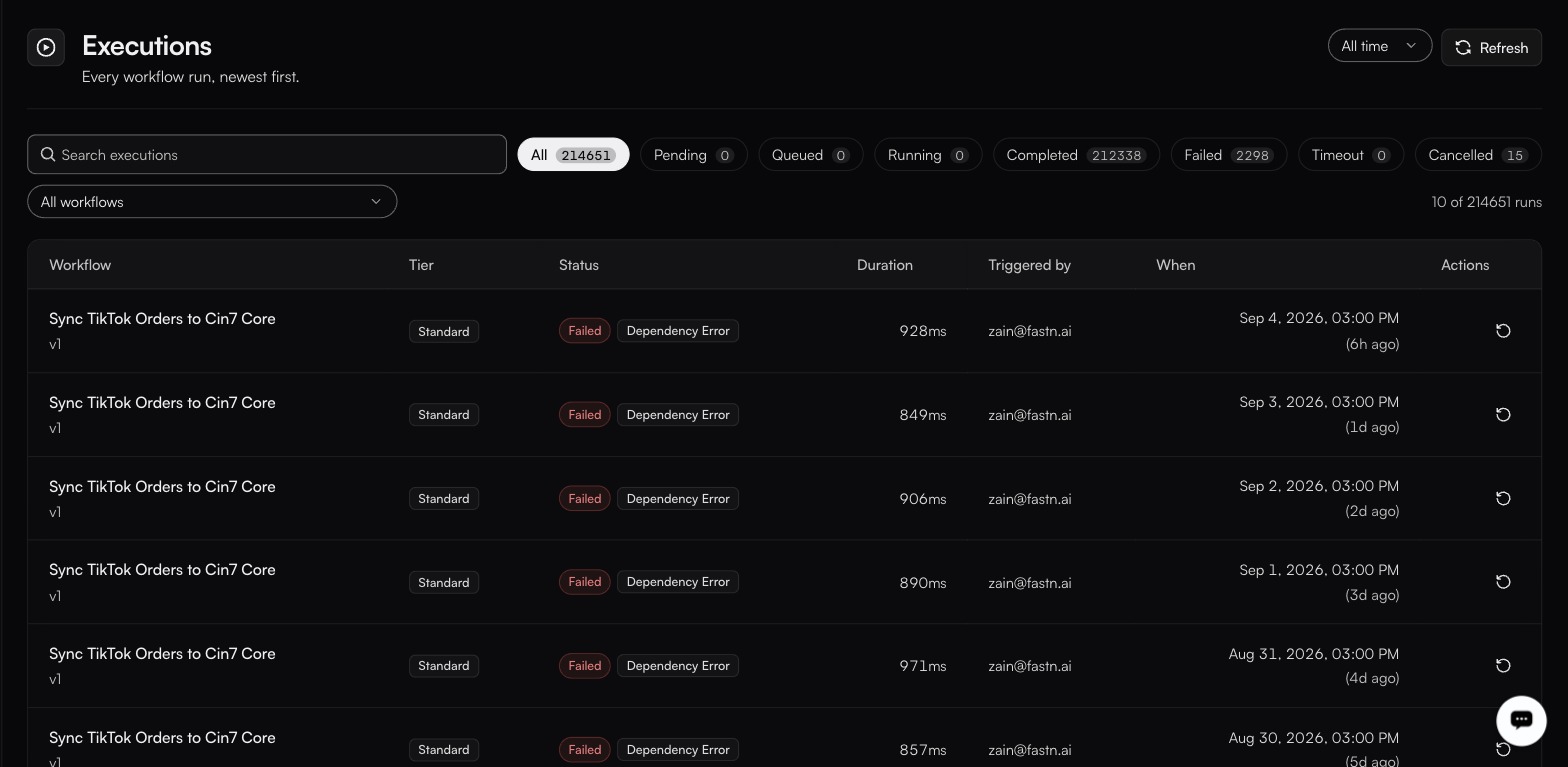
A daily 3 PM schedule failing the same way every day, the pattern the Workflow filter is for.
The workspace-wide run history. Each workflow also has its own Executions tab in the editor.
### The table
| Column | Notes |
| ---------------- | --------------------------------------------- |
| **Workflow** | Name, with a version chip. |
| **Tier** | Instant, Standard or Long. |
| **Status** | See below. |
| **Duration** | How long the run took. |
| **Triggered by** | What started it. |
| **When** | Timestamp, in your timezone. |
| **Actions** | The **Replay** control re-runs the execution. |
**Rows per page** is 10, 20 or 50.
### Filters
| Filter | Values |
| ---------- | ------------------------------------------------------------------------ |
| Date range | **All time** (default), Last 15m, 1h, 6h, 24h, 7d, 30d |
| Status | **All**, Pending, Queued, Running, Completed, Failed, Timeout, Cancelled |
| Workflow | One workflow, or all |
Alongside them: **Search executions** and **Refresh**.
| Status | Meaning |
| ------------- | ------------------------------- |
| **Pending** | Accepted, not yet queued. |
| **Queued** | Waiting for a runner. |
| **Running** | In progress. |
| **Completed** | Finished successfully. |
| **Failed** | Raised an error. |
| **Timeout** | Exceeded its execution timeout. |
| **Cancelled** | Stopped before finishing. |
### Opening a run
This is where debugging actually happens. A row expands **inline** (you do not leave the page), into:
* A **result banner** for the run, and its **Raw response**.
* Chips summarising the run: **Steps**, **Success**, **Error**, **Slowest**.
* Tabs **Summary**, **Input** and **Output**.
* A footer carrying the two identifiers you need when asking anyone else about the run: `exec_…` and `wf_…`.
The Summary JSON carries the keys worth knowing by name:
| Key | Tells you |
| --------------------------------------- | ----------------------------------------------------------- |
| `totalSteps`, `succeeded`, `failed` | How much of the run got through. |
| `slowestStep`, `slowestMs` | Where the time went: the first thing to read on a slow run. |
| `peakSandboxMB`, `sandboxMemoryLimitMB` | How close the run came to its memory ceiling. |
{% hint style="warning" %}
Read `peakSandboxMB` against `sandboxMemoryLimitMB` on any run that failed without an obvious error. Out-of-memory is one of the failures a retry policy never retries, so an OOM run will not quietly recover the way a transient failure does. It just stops.
{% endhint %}
### Reading the statuses
**Failed** is a workflow error: bad data, a rejected call, a bug. Expand the row for the result banner and raw response, then check [Traces](/operate/traces.md) for the external call behind it.
**Timeout** means the tier's budget ran out. Either the work genuinely needs longer, or a single external call is hanging. Check [Traces](/operate/traces.md) before raising the timeout.
**Queued** for an extended period means the run has been accepted but has not yet reached a runner.
**Cancelled** means the run stopped before finishing.
### The per-workflow tab
The **Executions** tab inside a workflow's editor filters differently: its pills are HTTP status codes (**All**, `200`, `201`, `400`, `404`, `422`, `500`), rather than run statuses. Use this page when you want to know *how a run ended*, and that tab when you want to know *what the caller got back*.
---
# Agent Instructions
This documentation is published with GitBook. GitBook is the documentation platform designed so that both humans and AI agents can read, navigate, and reason over technical content effectively. Learn more at gitbook.com.
## Querying This Documentation
If you need additional information that is not directly available in this page, you can query the documentation by asking a question.
Perform an HTTP GET request on the following URL with the `ask` and `goal` query parameters:
```
GET https://docs.fastn.ai/operate/executions.md?ask=&goal=
```
`ask` is the immediate question: it should be specific, self-contained, and written in natural language.
`goal` is what the user is ultimately trying to achieve, the reason they need the answer. Sharing it helps GitBook give you a better, more relevant answer. A goal is most helpful when it describes the outcome the user wants rather than restating the question. For example, with `ask=how do I create an API token`, a goal like `automate deployments from our CI pipeline` lets GitBook tailor the answer to that use case.
The response will contain a direct answer to the question and relevant excerpts and sources from the documentation.
Use this mechanism when the answer is not explicitly present in the current page, you need clarification or additional context, or you want to retrieve related documentation sections.