> For the complete documentation index, see [llms.txt](https://docs.fastn.ai/llms.txt). Markdown versions of documentation pages are available by appending `.md` to page URLs; this page is available as [Markdown](https://docs.fastn.ai/operate/events.md).
# Events
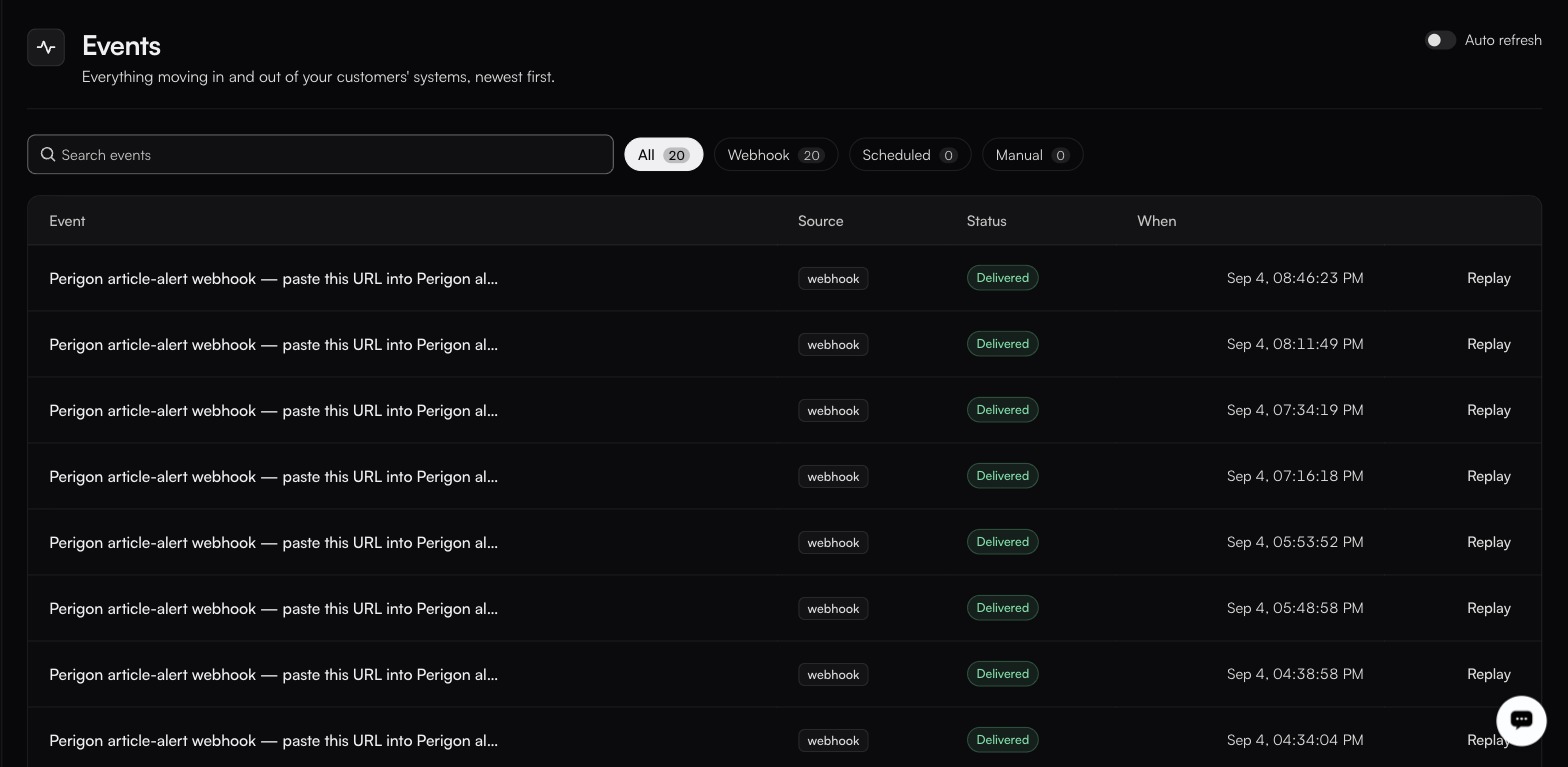
Everything moving in and out of your customers' systems, newest first.
**Activity → Events**
Auto refresh, top-right, is off by default.
An event is one inbound arrival: a webhook fired, a schedule reached, or a manual run. This is the first place to look when something did not happen.
### The table
| Column | Notes |
| ---------- | ---------------------------------------------------- |
| **Event** | The event identifier. |
| **Source** | Where it came from: `webhook` on every row observed. |
| **Status** | `Delivered` on a successful hand-off. |
| **When** | Timestamp, in your timezone. |
| **Replay** | Re-delivers the row. See below. |
Filter chips carry live counts (**All**, **Webhook**, **Scheduled**, **Manual**) so you can see at a glance whether your schedules are firing. **Search events** narrows the list.
The list is not paginated, and rows do not expand. To see what a run did with an event, go to [Executions](/operate/executions.md).
### Auto refresh
The toggle top-right is **off** by default. Turn it on to keep the list current without reloading (useful while you are testing a webhook from the sending system) and off again when you want to read a stable list.
### Replay
Every row has **Replay**, which re-delivers the same payload to the same workflow. Use it after fixing a workflow that failed on an event you cannot ask the sender to resend.
{% hint style="warning" %}
Replay re-runs the workflow for real. If the workflow writes to an external system, and it has no deduplication key, replaying can create duplicates. Set a [deduplication key](/build/triggers.md) on the webhook trigger before you need it.
{% endhint %}
An event that exhausts its delivery attempts shows a failure state in the **Status** column and can be re-sent with **Replay** once the cause is fixed. Attempt count and backoff are configured on the trigger, not here.
### When nothing is listed
An empty filter gives you **Nothing matches that filter**, with:
> Events arrive as your customers use their connected systems. Widen the filter, or check that a trigger is listening.
and a **Show all events** button. Take the second half of that literally: an empty Events log with a trigger you expected to fire is a trigger problem, not an events problem. See [Triggers](/build/triggers.md).
### Events versus executions
An event is *something arrived*. An execution is *a workflow ran*. One event can produce several executions when a webhook fans out to multiple routes, and an event can be Delivered while the execution it started fails. Check both.
---
# Agent Instructions
This documentation is published with GitBook. GitBook is the documentation platform designed so that both humans and AI agents can read, navigate, and reason over technical content effectively. Learn more at gitbook.com.
## Querying This Documentation
If you need additional information that is not directly available in this page, you can query the documentation by asking a question.
Perform an HTTP GET request on the following URL with the `ask` and `goal` query parameters:
```
GET https://docs.fastn.ai/operate/events.md?ask=&goal=
```
`ask` is the immediate question: it should be specific, self-contained, and written in natural language.
`goal` is what the user is ultimately trying to achieve, the reason they need the answer. Sharing it helps GitBook give you a better, more relevant answer. A goal is most helpful when it describes the outcome the user wants rather than restating the question. For example, with `ask=how do I create an API token`, a goal like `automate deployments from our CI pipeline` lets GitBook tailor the answer to that use case.
The response will contain a direct answer to the question and relevant excerpts and sources from the documentation.
Use this mechanism when the answer is not explicitly present in the current page, you need clarification or additional context, or you want to retrieve related documentation sections.