> For the complete documentation index, see [llms.txt](https://docs.fastn.ai/llms.txt). Markdown versions of documentation pages are available by appending `.md` to page URLs; this page is available as [Markdown](https://docs.fastn.ai/manage/secrets.md).
# Secrets
Encrypted values your workflows read at runtime.
**Settings → Secrets**
> Encrypted values your workflows read at runtime. Scope a secret to a customer or environment for per-tenant overrides.
The panel scrolls past what is shown here, an Environment selector follows Customer.
A secret is written once and never shown again, so a key never has to live in your code:
```javascript
const apiToken = await fastn.secrets.get("SHOPIFY_API_TOKEN");
```
With no secrets yet, the page shows **No secrets yet** above the same instruction:
> A secret is written once and never shown again. Workflows read it with fastn.secrets.get.
### The list
Once secrets exist, the page is a table:
| Column | Holds |
| ------------------------- | ------------------------------------------------------------------------------------------------------------------ |
| **Name** | The UPPER\_SNAKE\_CASE name, which is what your code passes to `fastn.secrets.get()`. |
| **Type** | `Text` or `JSON`. |
| **Scope** | Where the value applies: `org` for an org-wide default, otherwise the customer and/or environment it is pinned to. |
| **Created** / **Updated** | Dates. Overwriting a value moves **Updated**, since a secret is replaced rather than versioned. |
Each row ends in **Edit** and a delete control. The value itself is never shown in the table: only its metadata.
### Creating one
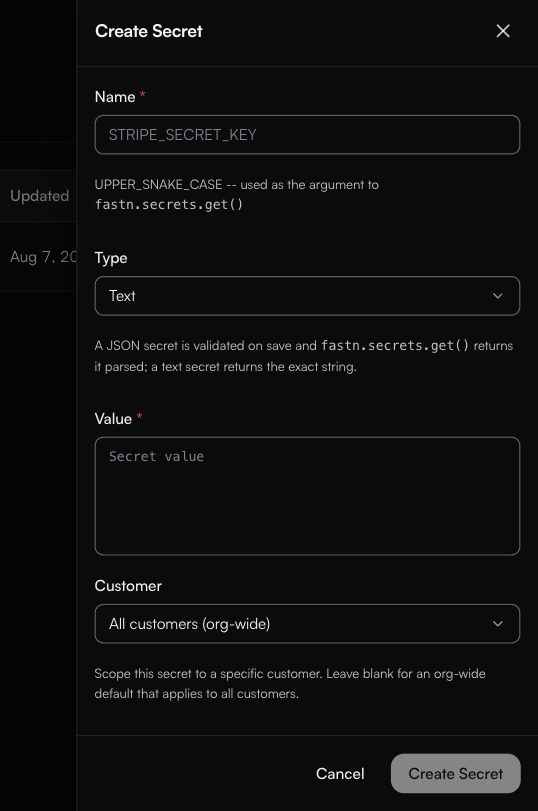
**New secret** opens the **Create Secret** side panel, which has five fields. The panel scrolls: **Environment** sits below **Customer**, past the fold.
| Field | Notes |
| --------------- | ------------------------------------------------------------------------------------------------------------------------------------------------------------------------------------------------ |
| **Name \*** | UPPER\_SNAKE\_CASE. This string is literally the argument to `fastn.secrets.get()`, so `SHOPIFY_API_TOKEN` here is `fastn.secrets.get("SHOPIFY_API_TOKEN")` in code. |
| **Type** | **Text** (the default) or **JSON**. The panel states the difference: *"A JSON secret is validated on save and `fastn.secrets.get()` returns it parsed; a text secret returns the exact string."* |
| **Value \*** | The value itself. Written once; the screen does not show it again afterwards. |
| **Customer** | Defaults to **All customers (org-wide)**; the dropdown lists your customers. *"Scope this secret to a specific customer. Leave blank for an org-wide default that applies to all customers."* |
| **Environment** | Defaults to **All environments**; the other choices are **test** and **Live**. *"Scope this secret to a specific environment. Leave blank for an org-wide default."* |
To change a value, write a new one over the same name.
### Scoping
A secret can be org-wide, or scoped to a **customer**, an **environment**, or both, which is what gives you per-tenant overrides without branching in code. The same `fastn.secrets.get("PARTNER_TOKEN")` call is what runs for everybody.
{% hint style="info" %}
How fastn picks between a customer-scoped and an environment-scoped value when both could match is not documented here. If you rely on overlapping scopes, set one up and confirm which value a run actually reads before you build on it.
{% endhint %}
### What belongs here
Third-party API tokens, database credentials, signing keys, webhook signing secrets: anything you would not paste into a ticket.
What does **not** belong here: connector credentials. Those live on [connections](/build/connections.md) and are managed by fastn, including OAuth refresh.
{% hint style="warning" %}
Deleting a secret takes effect immediately. Any workflow calling `fastn.secrets.get` for that name starts failing on its next run.
{% endhint %}
For non-sensitive per-environment values, use [Configs](/manage/configs.md) instead.
---
# Agent Instructions
This documentation is published with GitBook. GitBook is the documentation platform designed so that both humans and AI agents can read, navigate, and reason over technical content effectively. Learn more at gitbook.com.
## Querying This Documentation
If you need additional information that is not directly available in this page, you can query the documentation by asking a question.
Perform an HTTP GET request on the following URL with the `ask` and `goal` query parameters:
```
GET https://docs.fastn.ai/manage/secrets.md?ask=&goal=
```
`ask` is the immediate question: it should be specific, self-contained, and written in natural language.
`goal` is what the user is ultimately trying to achieve, the reason they need the answer. Sharing it helps GitBook give you a better, more relevant answer. A goal is most helpful when it describes the outcome the user wants rather than restating the question. For example, with `ask=how do I create an API token`, a goal like `automate deployments from our CI pipeline` lets GitBook tailor the answer to that use case.
The response will contain a direct answer to the question and relevant excerpts and sources from the documentation.
Use this mechanism when the answer is not explicitly present in the current page, you need clarification or additional context, or you want to retrieve related documentation sections.