> For the complete documentation index, see [llms.txt](https://docs.fastn.ai/llms.txt). Markdown versions of documentation pages are available by appending `.md` to page URLs; this page is available as [Markdown](https://docs.fastn.ai/manage/roles.md).
# Roles
What each role can do, and how to narrow one.
**Settings → Roles**
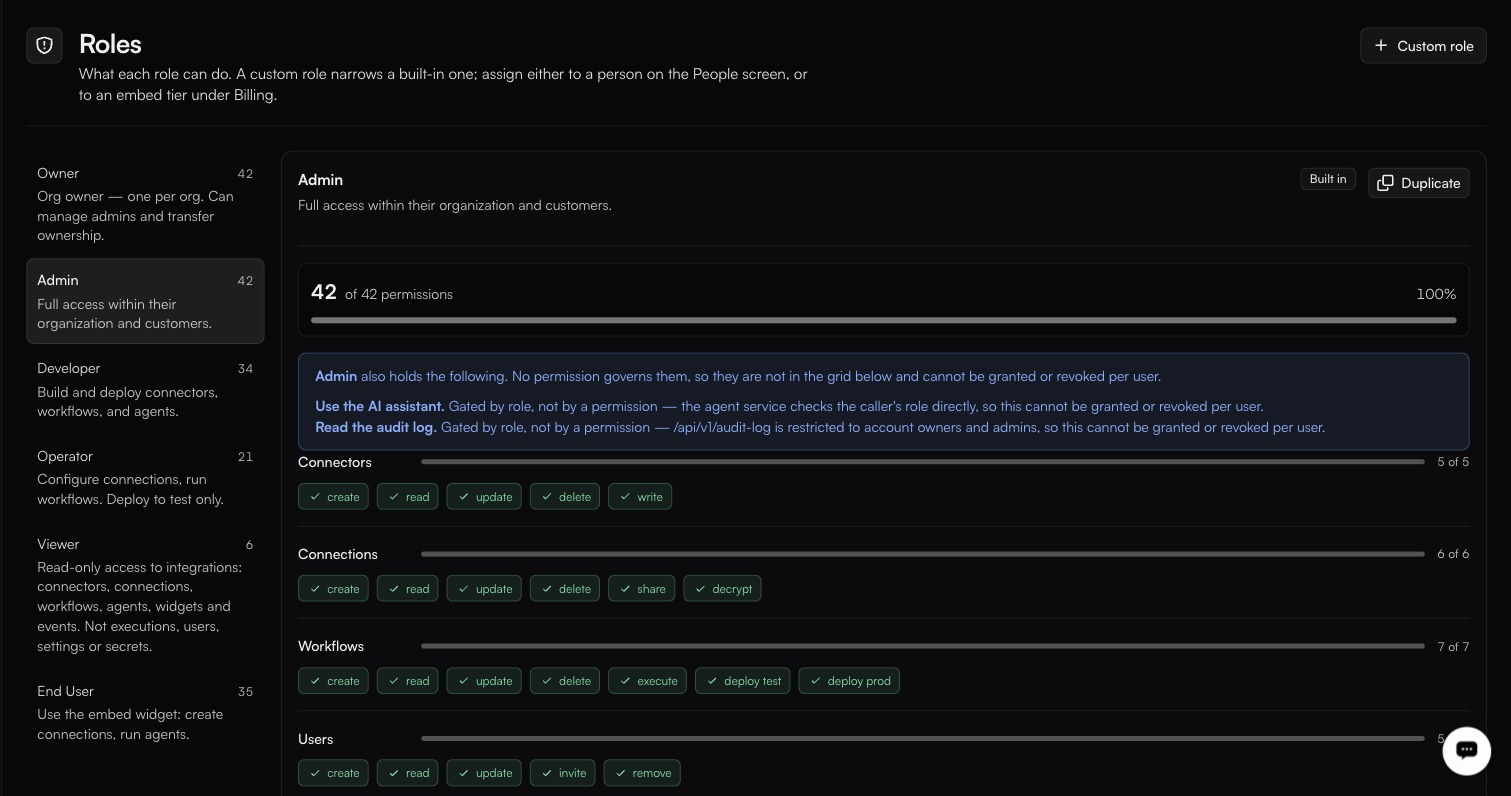
Two capabilities are called out as role-gated rather than grantable: using the AI assistant and reading the audit log.
> A custom role narrows a built-in one; assign either to a person on the People screen, or to an embed tier under Billing.
### The six built-in roles
| Role | Permissions | Summary |
| ------------- | ----------- | ------------------------------------------------------------------------------------------------------------------------ |
| **Owner** | 42 | One per organisation. Manages admins and transfers ownership. |
| **Admin** | 42 | Full access within their organisation and customers. |
| **Developer** | 34 | Builds and deploys connectors, workflows and agents. |
| **Operator** | 21 | Configures connections and runs workflows. Deploys to test only. |
| **Viewer** | 6 | Read-only on connectors, connections, workflows, agents, widgets and events. Not executions, users, settings or secrets. |
| **End User** | 35 | Uses the embed widget: creates connections, runs agents. |
Selecting a role on the left shows its permission matrix, the count it holds out of 42, and a percentage bar. Built-in roles carry a **Built in** badge.
### Platform Admin
A seventh role, **Platform Admin**, appears in the organisation switcher rather than on this screen. It is platform-level (held by fastn, not something you assign to someone inside your own organisation) and it is what publishes connectors to the public catalogue.
### Roles here are not API-key permissions
The six roles on this screen govern **people**. API keys carry their own permission presets (`Full access`, `Developer`, `Operator`, `Viewer` (the default), `End user` and `Custom`), chosen on the key creation dialog. The names overlap, but they are two separate systems configured in two different places; granting a person the Developer role does nothing to a key, and vice versa. See [API keys](/manage/api-keys.md).
### The permission matrix
| Resource | Permissions |
| --------------- | --------------------------------------------------------------- |
| **Connectors** | create, read, update, delete, write |
| **Connections** | create, read, update, delete, share, decrypt |
| **Workflows** | create, read, update, delete, execute, deploy test, deploy prod |
| **Users** | create, read, update, invite, remove |
| **Settings** | read, update, manage |
| **Events** | create, read, update, delete, replay |
| **Secrets** | read, write, delete |
| **Executions** | create, read |
| **Widgets** | create, read, update, delete |
| **Unified API** | read, execute |
### Two capabilities that are not permissions
Two things are gated by role directly rather than by a grantable permission, and cannot be turned on or off per user:
* **Use the AI assistant**: the agent service checks the caller's role.
* **Read the audit log**: `/api/v1/audit-log` is restricted to account owners and admins.
Both are called out in a banner at the top of any role that has them.
### Custom roles
**Custom role**, or **Duplicate** on a built-in, creates a role that *narrows* its parent. You can take permissions away; you cannot add ones the parent does not have.
Assign a custom role to a person on [People](/manage/people.md), or (as the line at the top of this screen puts it), to an embed tier under [Billing](/manage/billing.md), which is how you scope what an embedded end user may do.
### The boundary worth knowing
**Operator** is described on this screen as deploying **to test only**. Whether **Developer** holds `deploy prod` is the difference that usually draws the line between people who build and people who run: check the Developer matrix on this screen before you rely on it either way.
`decrypt` on Connections and `read` on Secrets are the two most sensitive permissions in the matrix. Viewer holds neither. Operator's matrix is worth reading directly rather than assumed.
---
# Agent Instructions
This documentation is published with GitBook. GitBook is the documentation platform designed so that both humans and AI agents can read, navigate, and reason over technical content effectively. Learn more at gitbook.com.
## Querying This Documentation
If you need additional information that is not directly available in this page, you can query the documentation by asking a question.
Perform an HTTP GET request on the following URL with the `ask` and `goal` query parameters:
```
GET https://docs.fastn.ai/manage/roles.md?ask=&goal=
```
`ask` is the immediate question: it should be specific, self-contained, and written in natural language.
`goal` is what the user is ultimately trying to achieve, the reason they need the answer. Sharing it helps GitBook give you a better, more relevant answer. A goal is most helpful when it describes the outcome the user wants rather than restating the question. For example, with `ask=how do I create an API token`, a goal like `automate deployments from our CI pipeline` lets GitBook tailor the answer to that use case.
The response will contain a direct answer to the question and relevant excerpts and sources from the documentation.
Use this mechanism when the answer is not explicitly present in the current page, you need clarification or additional context, or you want to retrieve related documentation sections.