> For the complete documentation index, see [llms.txt](https://docs.fastn.ai/llms.txt). Markdown versions of documentation pages are available by appending `.md` to page URLs; this page is available as [Markdown](https://docs.fastn.ai/manage/people.md).
# People
Who can see and change things in this workspace.
**Settings → People**
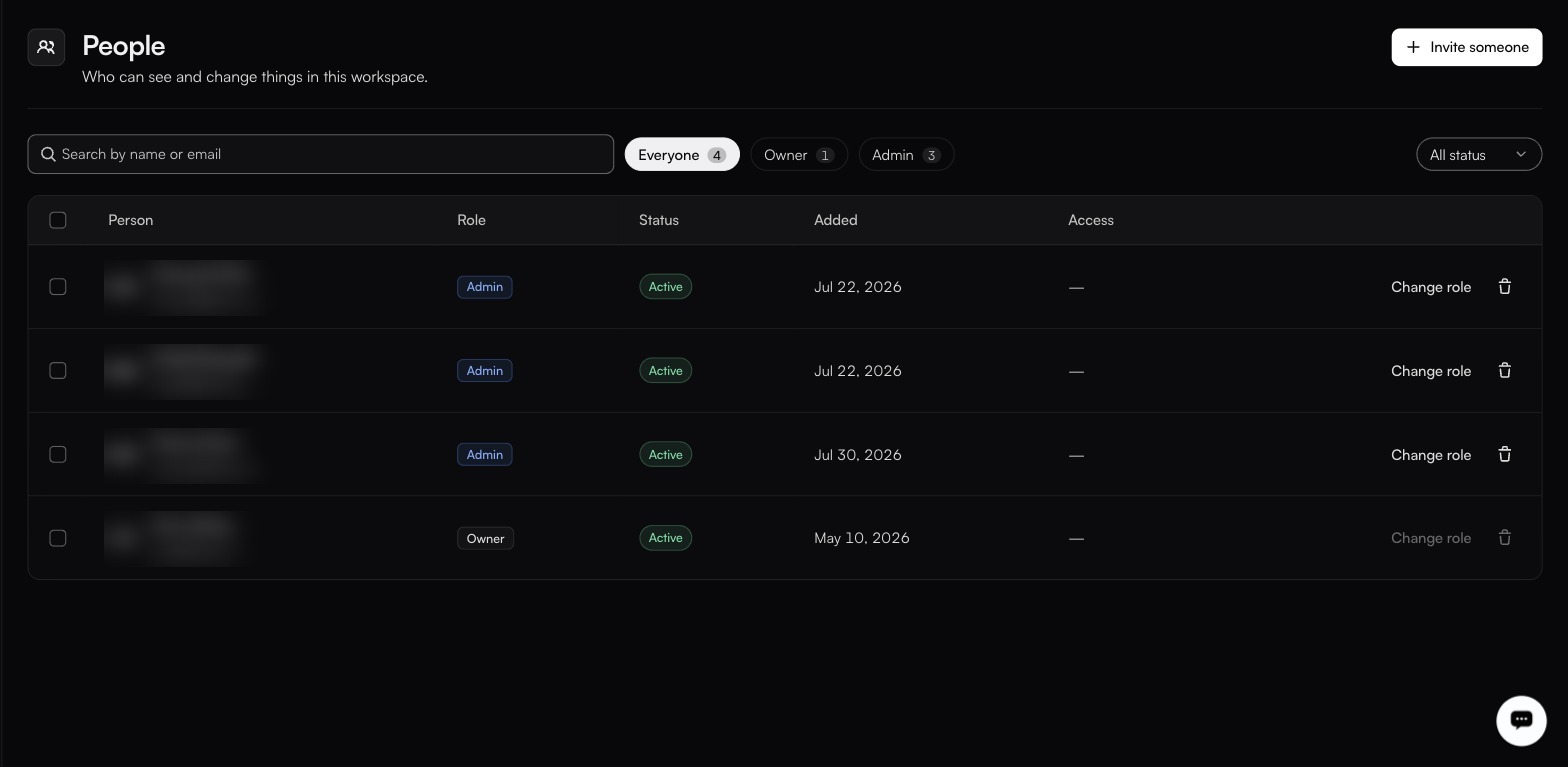
Change role is greyed out on the Owner's own row.
| Column | Notes |
| ---------- | ------------------------------------------------------------------ |
| **Person** | Name and email. |
| **Role** | Their assigned role. **Change role** edits it. |
| **Status** | **Active** in every observed row. See [Statuses](#statuses) below. |
| **Added** | When they joined. |
| **Access** | Any scoping beyond the role. It showed `—` in every observed row. |
**Search by name or email** narrows the list. Filter chips carry a count per role (Everyone, Owner, Admin and so on) and the dropdown on the right filters by status. Each row carries a checkbox; no bulk-action control was visible alongside them.
### Inviting someone
**Invite someone** sends an invitation to an email address with a role attached. Until they accept, they appear with status **Invited**.
If you have set up [domain joining](/manage/general.md), people on that domain can request access instead of waiting for an invite, and the role you configured there is preselected when you invite them.
### Changing a role
**Change role** on any row. What you may assign is bounded by your own role. You cannot grant more than you hold.
**Change role** is disabled on the Owner's own row, so the Owner's role cannot be reassigned from this screen. There is exactly one Owner per organisation.
### Removing someone
The trash icon removes a person from the workspace. Their audit-log history stays, so *who did what* remains answerable after they leave.
{% hint style="info" %}
API keys are workspace credentials rather than personal ones, so do not assume that removing a person revokes the keys they created. Confirm on [API keys](/manage/api-keys.md) and rotate anything they had access to.
{% endhint %}
### Statuses
**Active** is the only status observed in the product. The rest are the values the filter dropdown offers; treat their exact meanings as provisional until you have seen one.
| Status | Meaning |
| ------------- | ------------------------------------------------- |
| **Active** | Signed up and usable. Confirmed. |
| **Invited** | Invitation sent, not yet accepted. Provisional. |
| **Disabled** | Cannot sign in. Provisional. |
| **Suspended** | Access withdrawn pending a decision. Provisional. |
What each role can actually do is on the next page.
{% content-ref url="/pages/77QHtoGMf0SrvnYOP9yw" %}
[Roles](/manage/roles.md)
{% endcontent-ref %}
---
# Agent Instructions
This documentation is published with GitBook. GitBook is the documentation platform designed so that both humans and AI agents can read, navigate, and reason over technical content effectively. Learn more at gitbook.com.
## Querying This Documentation
If you need additional information that is not directly available in this page, you can query the documentation by asking a question.
Perform an HTTP GET request on the following URL with the `ask` and `goal` query parameters:
```
GET https://docs.fastn.ai/manage/people.md?ask=&goal=
```
`ask` is the immediate question: it should be specific, self-contained, and written in natural language.
`goal` is what the user is ultimately trying to achieve, the reason they need the answer. Sharing it helps GitBook give you a better, more relevant answer. A goal is most helpful when it describes the outcome the user wants rather than restating the question. For example, with `ask=how do I create an API token`, a goal like `automate deployments from our CI pipeline` lets GitBook tailor the answer to that use case.
The response will contain a direct answer to the question and relevant excerpts and sources from the documentation.
Use this mechanism when the answer is not explicitly present in the current page, you need clarification or additional context, or you want to retrieve related documentation sections.