> For the complete documentation index, see [llms.txt](https://docs.fastn.ai/llms.txt). Markdown versions of documentation pages are available by appending `.md` to page URLs; this page is available as [Markdown](https://docs.fastn.ai/manage/environments.md).
# Environments and GitHub
Deployment stages, and the GitHub review gate in front of them.
**Settings → Environments**
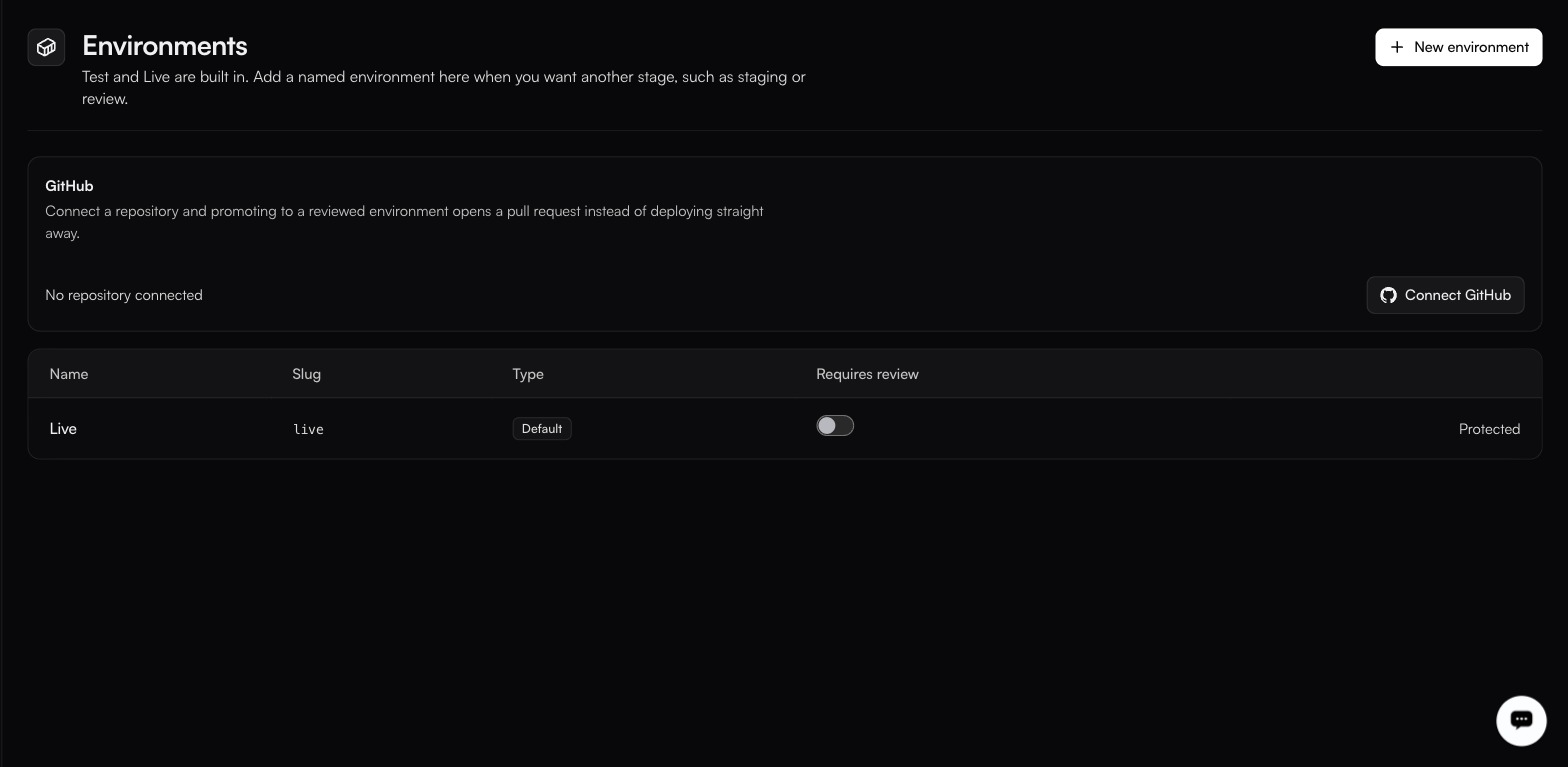
What a workspace looks like before anyone adds a stage: one built-in Live target and no review gate in front of it.
> Test and Live are built in. Add a named environment here when you want another stage, such as staging or review.
### Environments
| Column | Notes |
| ------------------- | ----------------------------------------------------------------------------------------------------------------- |
| **Name** | Display name. |
| **Slug** | Used in the `x-fastn-env` header and in trigger routes. |
| **Type** | Default, or a named environment you created. |
| **Requires review** | A toggle per environment, off by default. Switched on, promoting to it opens a pull request instead of deploying. |
Live carries a **Protected** badge. Read that as fastn marking it as the one you should not casually restructure; whether the badge also hard-blocks deletion is not something this page can confirm.
**New environment** opens the **Create Environment** dialog, which adds a stage and asks for two things:
| Field | Notes |
| ----------- | ----------------------------------------------------------------------------------------------------------------------------- |
| **Name \*** | Display name, for example `Staging`. |
| **Slug \*** | What goes in `x-fastn-env` and in trigger routes. The form notes that `test` and `live` are built in, so those two are taken. |
A named environment runs whatever version is deployed to it. If nothing has been deployed there, there is no code for a trigger pointed at it to run: deploy before you point traffic at a new stage.
### The special value `test`
In trigger routes and in the `x-fastn-env` header, `test` is not a deployed environment. It means *the workflow's latest published version*. Any other slug means *the version deployed to that environment*. That is why the table is a list of deployment targets, with `test` handled by the platform rather than sitting among them.
### GitHub
A **GitHub** panel sits above the table, explaining what connecting a repository buys you:
> Connect a repository and promoting to a reviewed environment opens a pull request instead of deploying straight away.
Until you connect one, its status reads **No repository connected** and the only control is **Connect GitHub**. That is what a new workspace sees, and it is worth knowing that the review gate does nothing on its own: it needs both a repository here and **Requires review** switched on for the environment you are promoting into.
Once a repository is connected the panel shows it, along with controls for mirroring workflows to the repo and for disconnecting. Those controls were not captured on a connected workspace, so check what disconnecting does to anything already deployed before you use it rather than assuming it is inert.
### A workable setup
1. Connect the repository.
2. Add a `staging` environment.
3. Tick **Requires review** on it.
4. Developers publish; the promotion opens a pull request; the reviewed and merged version deploys to staging.
5. Promote from staging to live once it has run against real traffic.
{% hint style="success" %}
The repository plus **Requires review** is the single change that turns fastn from a place where anyone can push to production into one with a real approval trail. If you have more than a couple of people building, do it.
{% endhint %}
Publishing and deploying are both recorded in the [audit log](/manage/audit-log.md).
---
# Agent Instructions
This documentation is published with GitBook. GitBook is the documentation platform designed so that both humans and AI agents can read, navigate, and reason over technical content effectively. Learn more at gitbook.com.
## Querying This Documentation
If you need additional information that is not directly available in this page, you can query the documentation by asking a question.
Perform an HTTP GET request on the following URL with the `ask` and `goal` query parameters:
```
GET https://docs.fastn.ai/manage/environments.md?ask=&goal=
```
`ask` is the immediate question: it should be specific, self-contained, and written in natural language.
`goal` is what the user is ultimately trying to achieve, the reason they need the answer. Sharing it helps GitBook give you a better, more relevant answer. A goal is most helpful when it describes the outcome the user wants rather than restating the question. For example, with `ask=how do I create an API token`, a goal like `automate deployments from our CI pipeline` lets GitBook tailor the answer to that use case.
The response will contain a direct answer to the question and relevant excerpts and sources from the documentation.
Use this mechanism when the answer is not explicitly present in the current page, you need clarification or additional context, or you want to retrieve related documentation sections.