> For the complete documentation index, see [llms.txt](https://docs.fastn.ai/llms.txt). Markdown versions of documentation pages are available by appending `.md` to page URLs; this page is available as [Markdown](https://docs.fastn.ai/manage/billing.md).
# Billing and limits
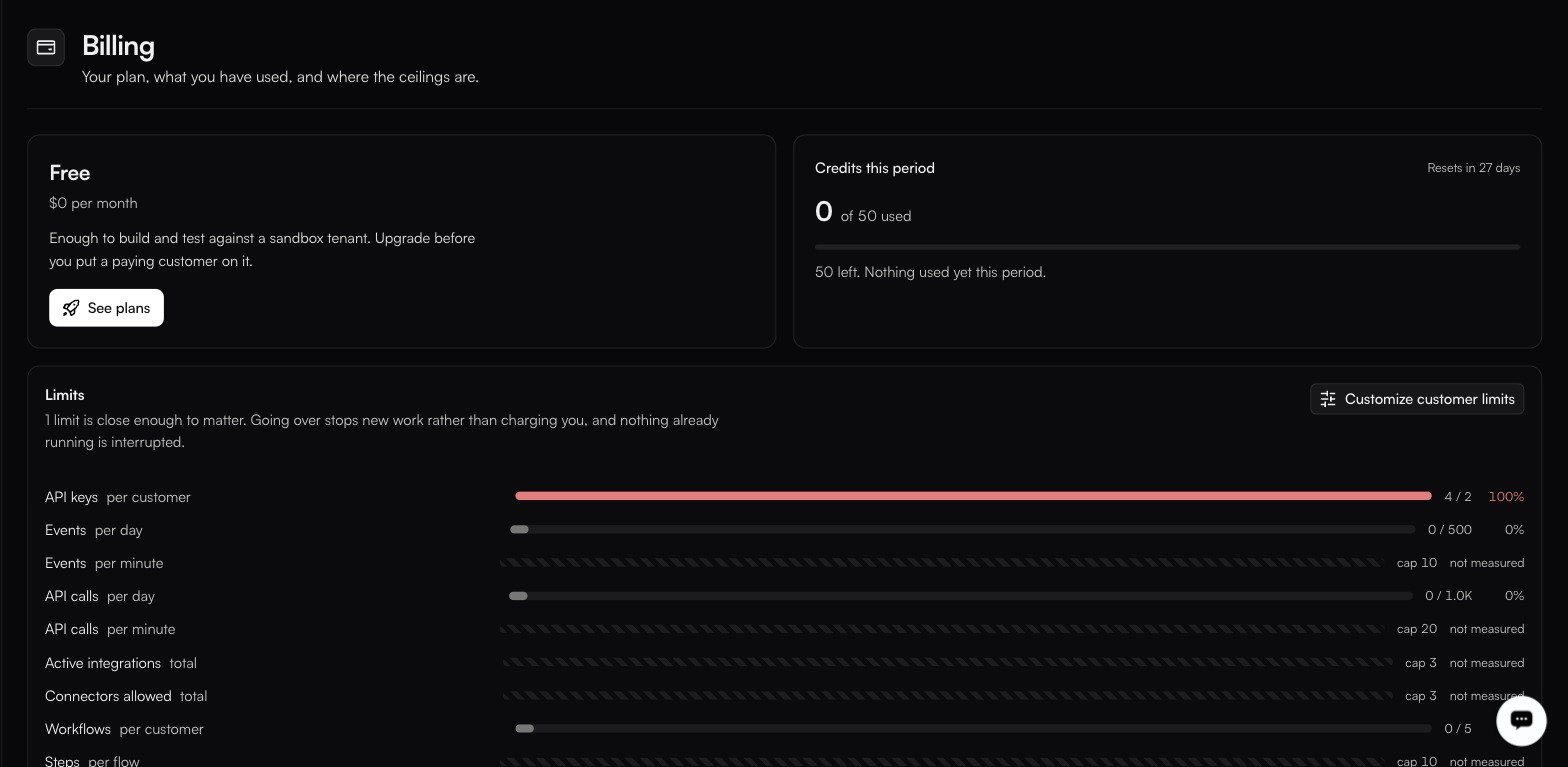
Your plan, what you have used, and where the ceilings are.
**Settings → Billing**
Rows marked not measured have a cap but no usage reading behind them.
### Plan and credits
The plan card shows what you are on and what it costs: **Free**, at **$0 per month**, until you upgrade. **See plans** is the upgrade control, and the only one on the page.
**Credits this period** tracks AI usage against the allowance. It is the same number as the AI credits readout in the top bar, and the popover behind that readout is where the detail lives: tabs for **Your usage** and **Org total**, a **By agent** breakdown, and a reset at the start of the calendar month, UTC.
### Limits
Each quota is listed with usage against it. **Customize customer limits** overrides limits for a single customer.
| Limit | Scope |
| ------------------- | ------------------- |
| API keys | per customer |
| Events | per day, per minute |
| API calls | per day, per minute |
| Active integrations | total |
| Connectors allowed | total |
| Workflows | per customer |
| Steps | per flow |
**Workflow categories** and **Workflow labels** are listed here too, both scoped per workspace and counted live, so the usage reading against them is real. They are the two registries behind [Workflows Tags](/manage/workflow-tags.md), and that page is where you add and remove them.
The list continues past the visible area with further rows: concurrency, AI sessions and tokens, retention, storage, connected accounts, users, webhook endpoints, payload size, executions and AI credits are all reported to appear further down. Scroll the page and read the rows themselves rather than relying on that list being complete or the scopes being as described.
{% hint style="info" %}
Going over a limit **stops new work rather than charging you, and nothing already running is interrupted.** No surprise invoices, but also no silent overage: a sync that stops because you hit a ceiling looks like a broken sync until you check this page.
{% endhint %}
### Below the fold
Sections further down this page (**Customer tiers** and **Create tier**, **Usage by customer**, **Payment** and **Invoices**), have not been captured, so this page does not describe how they behave. Read them in the product before planning around them.
One thing about tiers is corroborated from elsewhere: the [Roles](/manage/roles.md) screen states that a custom role can be assigned to an embed tier under Billing, which is how you scope what an embedded end user may do.
---
# Agent Instructions
This documentation is published with GitBook. GitBook is the documentation platform designed so that both humans and AI agents can read, navigate, and reason over technical content effectively. Learn more at gitbook.com.
## Querying This Documentation
If you need additional information that is not directly available in this page, you can query the documentation by asking a question.
Perform an HTTP GET request on the following URL with the `ask` and `goal` query parameters:
```
GET https://docs.fastn.ai/manage/billing.md?ask=&goal=
```
`ask` is the immediate question: it should be specific, self-contained, and written in natural language.
`goal` is what the user is ultimately trying to achieve, the reason they need the answer. Sharing it helps GitBook give you a better, more relevant answer. A goal is most helpful when it describes the outcome the user wants rather than restating the question. For example, with `ask=how do I create an API token`, a goal like `automate deployments from our CI pipeline` lets GitBook tailor the answer to that use case.
The response will contain a direct answer to the question and relevant excerpts and sources from the documentation.
Use this mechanism when the answer is not explicitly present in the current page, you need clarification or additional context, or you want to retrieve related documentation sections.