> For the complete documentation index, see [llms.txt](https://docs.fastn.ai/llms.txt). Markdown versions of documentation pages are available by appending `.md` to page URLs; this page is available as [Markdown](https://docs.fastn.ai/manage/audit-log.md).
# Audit log
Every action taken in this organisation.
**Settings → Audit log**
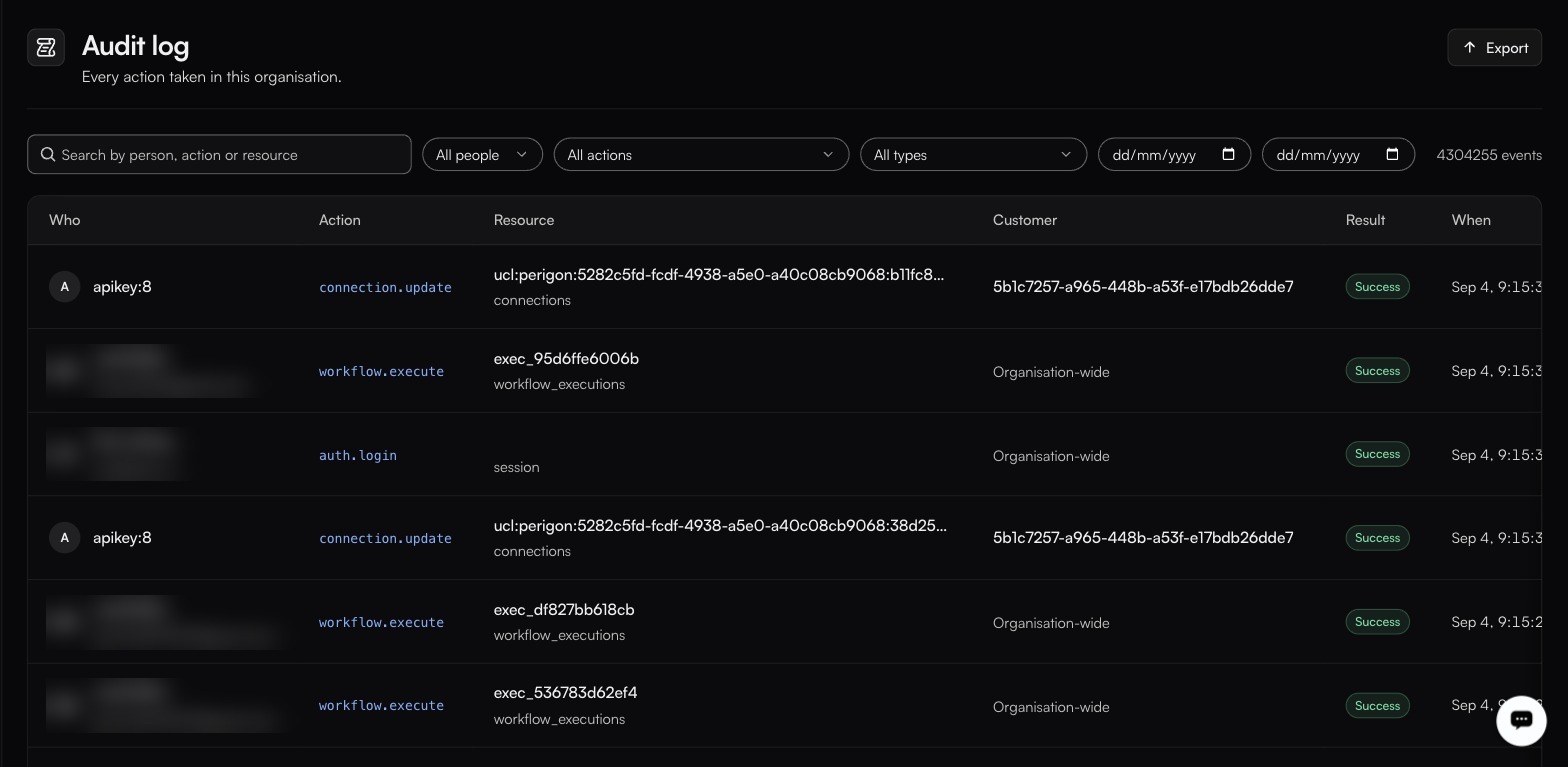
Filters for people, actions, types and a date range sit above the table, with Export top-right.
A complete, filterable record of everything anyone (or anything), did. The header carries the total, which runs high: a working organisation accumulates millions of events.
### The table
| Column | Notes |
| ------------ | ------------------------------------------------------------------------------- |
| **Who** | A person, or an API key in the form `apikey:8`. |
| **Action** | The action name: `auth.login`, `workflow.execute`, `connection.update`. |
| **Resource** | The object acted on, with its type underneath. |
| **Customer** | The customer scope, or **Organisation-wide**. |
| **Result** | **Success** on every observed row. How a failure renders has not been captured. |
| **When** | Timestamp. |
### Filters
Search by person, action or resource; then narrow by **people**, **actions**, **types**, and a date range. **Export** downloads the set currently filtered: check the file it produces for its format before wiring anything to it.
### Action families
Actions are namespaced, which is what makes filtering practical: `auth.login`, `workflow.execute` and `workflow.execute.completed` are all confirmed, and the pattern is `.`, sometimes with a terminal state appended.
Beyond those three, the surest way to see what your organisation actually emits is the **All actions** dropdown on this page. It lists the real vocabulary. Expect namespaces along these lines, but confirm there before you build a filter or an alert on one:
| Prefix | Likely covers |
| ------------------------------ | ------------------------------------------------------------------------------------------- |
| `auth.*` | Logins. `auth.login` confirmed. |
| `workflow.*` | Workflow lifecycle and runs. `workflow.execute` and `workflow.execute.completed` confirmed. |
| `api_key.*` | Key creation, rotation and revocation. |
| `connection.*`, `credential.*` | Connection lifecycle and token refresh. `connection.update` confirmed. |
| `connector.*` | Connector creation, publishing and deletion. |
| `secret.*`, `config.*` | Secret and config changes, who and when, not values. |
| `user.*`, `membership.*` | Access changes. |
| `environment.*` | Environment changes. |
### Who can read it
Restricted to account owners and admins. This is enforced by role at the API layer (`/api/v1/audit-log`) and cannot be granted or revoked per user. See [People and roles](/manage/roles.md).
### What to look for
| Question | Where to start |
| --------------------------------------- | ----------------------------------------------------------------------- |
| Who changed this workflow? | Filter to the workflow as the resource, then pick its update action. |
| Why did a connection start failing? | Filter to that customer, then to the connection and credential actions. |
| Who created that API key? | Filter to the key-creation action in **All actions**. |
| What did this key do? | Filter by the key. It appears under **All people** as `apikey:`. |
| Did anyone touch production last night? | The deploy action plus the date range. |
{% hint style="info" %}
Filter before you scroll, and export when you need to analyse. At this volume, scrolling is not a search strategy.
{% endhint %}
---
# Agent Instructions
This documentation is published with GitBook. GitBook is the documentation platform designed so that both humans and AI agents can read, navigate, and reason over technical content effectively. Learn more at gitbook.com.
## Querying This Documentation
If you need additional information that is not directly available in this page, you can query the documentation by asking a question.
Perform an HTTP GET request on the following URL with the `ask` and `goal` query parameters:
```
GET https://docs.fastn.ai/manage/audit-log.md?ask=&goal=
```
`ask` is the immediate question: it should be specific, self-contained, and written in natural language.
`goal` is what the user is ultimately trying to achieve, the reason they need the answer. Sharing it helps GitBook give you a better, more relevant answer. A goal is most helpful when it describes the outcome the user wants rather than restating the question. For example, with `ask=how do I create an API token`, a goal like `automate deployments from our CI pipeline` lets GitBook tailor the answer to that use case.
The response will contain a direct answer to the question and relevant excerpts and sources from the documentation.
Use this mechanism when the answer is not explicitly present in the current page, you need clarification or additional context, or you want to retrieve related documentation sections.