> For the complete documentation index, see [llms.txt](https://docs.fastn.ai/llms.txt). Markdown versions of documentation pages are available by appending `.md` to page URLs; this page is available as [Markdown](https://docs.fastn.ai/manage/api-keys.md).

# API keys

Programmatic access to your workspace.

**Settings → API keys**

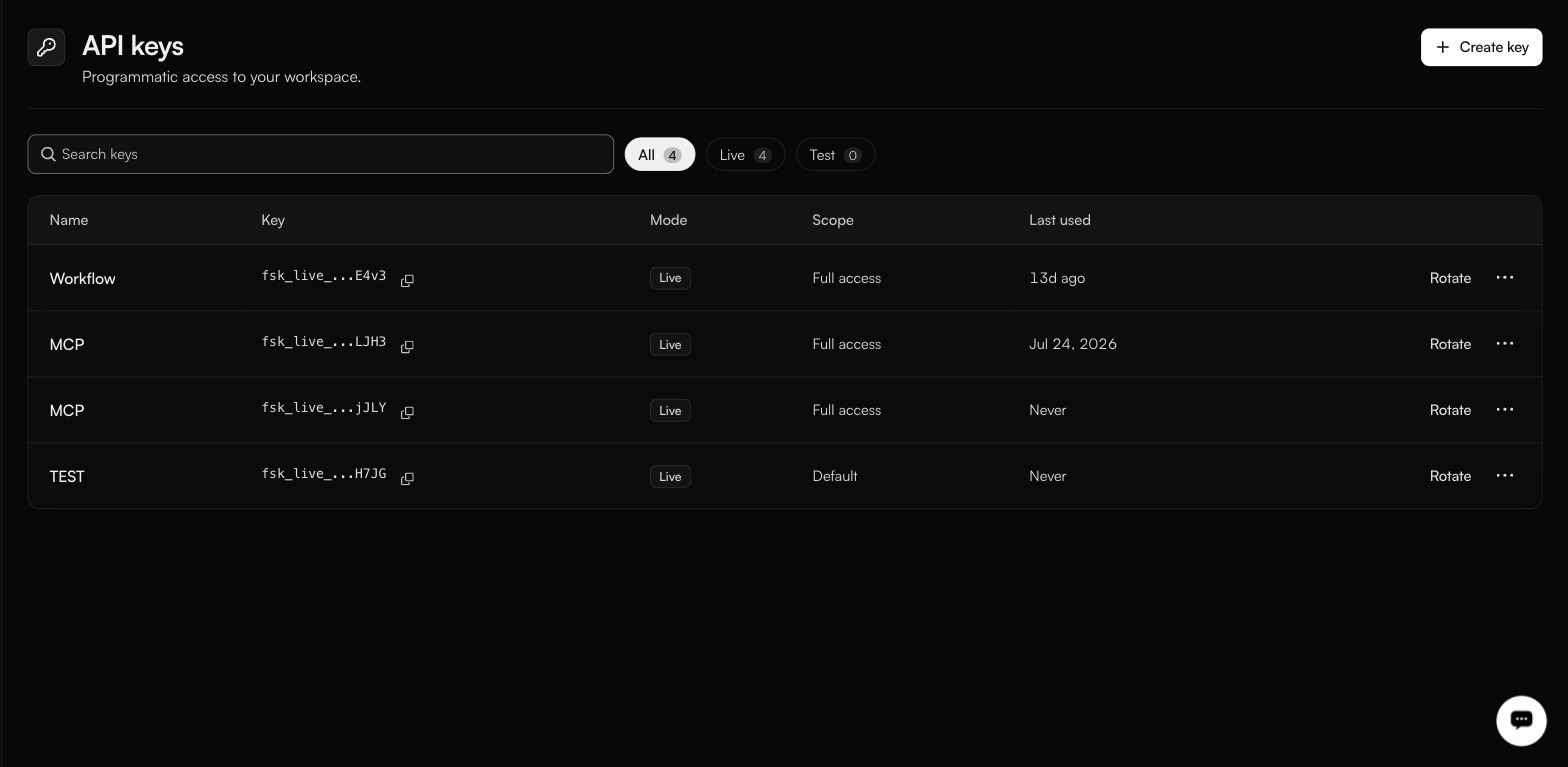
<figure><img src="https://1255842839-files.gitbook.io/~/files/v0/b/gitbook-x-prod.appspot.com/o/spaces%2F3iSr2Tx8FvvuoLPncziH%2Fuploads%2Fgit-blob-694a3dee40b7e0a303928e4bcef99a91efdc2c19%2Fsettings-api-keys.jpg?alt=media" alt="The API keys list with four rows (Workflow, two called MCP, and TEST), every one badged Live, three Full access and one Default, each offering Rotate; the filters read All 4, Live 4, Test 0"><figcaption><p>The Key column shows only a prefix and the last four characters, with a copy icon.</p></figcaption></figure>

| Column        | Notes                                              |
| ------------- | -------------------------------------------------- |
| **Name**      | What you called it.                                |
| **Key**       | Prefix and last four characters, with a copy icon. |
| **Mode**      | Live or Test.                                      |
| **Scope**     | The permissions it carries.                        |
| **Last used** | Timestamp, or Never.                               |

**Search keys** narrows the list, and the filters are **All** / **Live** / **Test**.

**Rotate** issues a new secret for the same key. The **…** menu holds **Edit**, **Identity verification** and **Revoke**. There is no delete. Revoking is the way a key ends.

### Creating a key

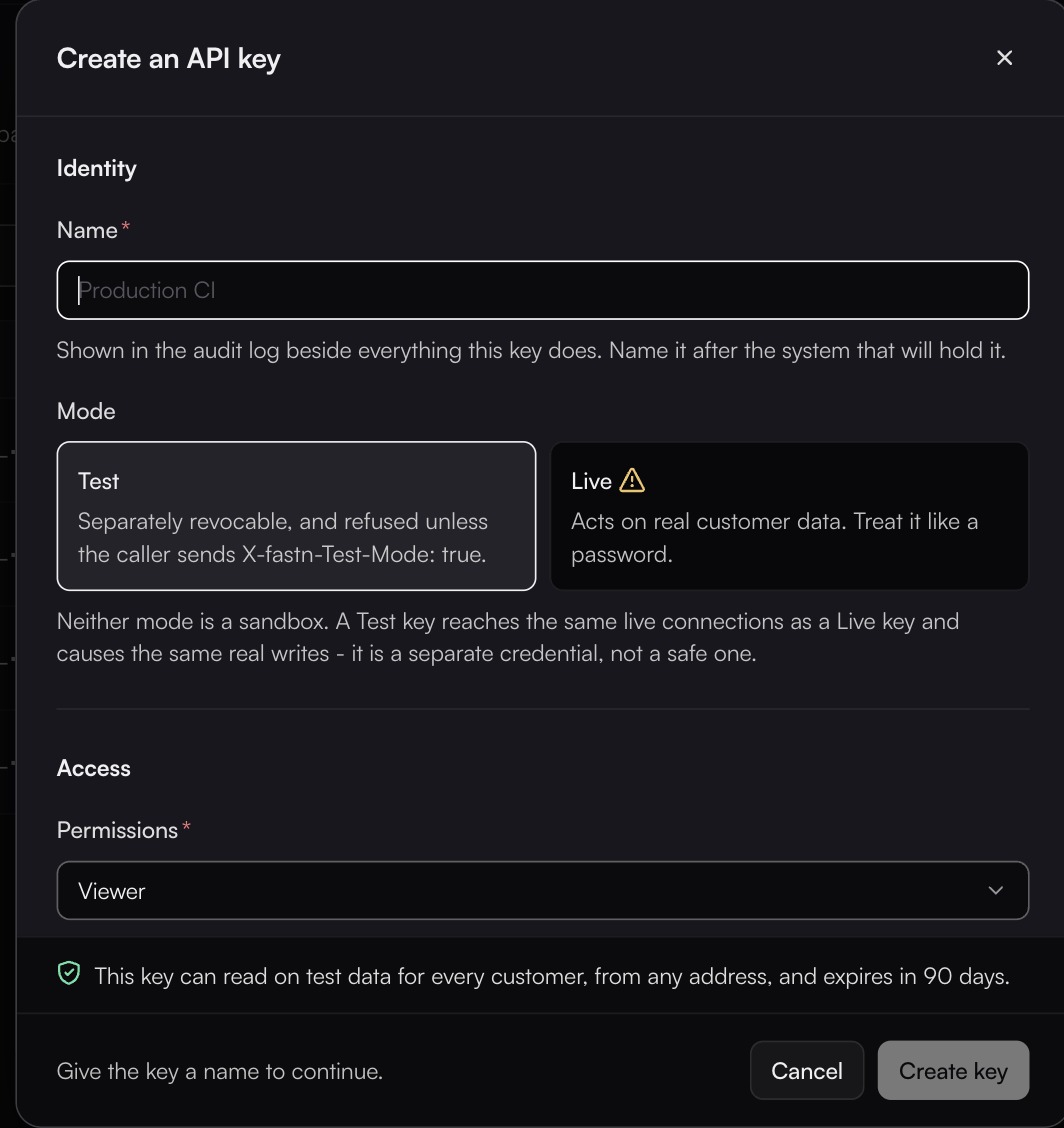
<figure><img src="https://1255842839-files.gitbook.io/~/files/v0/b/gitbook-x-prod.appspot.com/o/spaces%2F3iSr2Tx8FvvuoLPncziH%2Fuploads%2Fgit-blob-0963cb010fd937f987bad020f0053a8121cc0edd%2Fcreate-api-key.jpg?alt=media" alt="The Create an API key dialog with a Name field, Mode cards Test selected and Live carrying a warning, Permissions set to Viewer, and a line saying the key reads test data and expires in 90 days"><figcaption><p>The dialog spells out that Test is a separate credential, not a sandbox.</p></figcaption></figure>

The dialog runs in three sections: **Identity**, **Access** and **Limits**.

#### Identity

**Name \***: shown in the audit log beside everything this key does. Name it after the system that will hold it, not after a person.

**Mode**: **Test** or **Live**, defaulting to **Test**.

| Mode     | Behaviour                                                                            |
| -------- | ------------------------------------------------------------------------------------ |
| **Test** | Separately revocable, and refused unless the caller sends `X-fastn-Test-Mode: true`. |
| **Live** | Acts on real customer data. Treat it like a password.                                |

{% hint style="danger" %}
Neither mode is a sandbox. A Test key reaches the same live connections as a Live key and causes the same real writes. It is a separate credential, not a safe one.
{% endhint %}

#### Access

**Permissions \*** takes one of six presets: **Full access**, **Developer**, **Operator**, **Viewer** (the default), **End user** or **Custom**. These are key presets, not the people roles on [Roles](/manage/roles.md), even where the names match. Choose the narrowest that works: a key that only reads should stay on Viewer.

Whichever preset you pick, the **What it can touch** matrix below shows exactly what it grants, and **Custom** lets you set each box yourself. Ten resource groups:

| Resource        | Permissions                                                       |
| --------------- | ----------------------------------------------------------------- |
| **Connectors**  | create, read, update, delete, write                               |
| **Connections** | create, read, update, delete, share, decrypt                      |
| **Workflows**   | create, read, update, delete, execute, deploy\_test, deploy\_prod |
| **Users**       | create, read, update, invite, remove                              |
| **Settings**    | read, update, manage                                              |
| **Events**      | create, read, update, delete, replay                              |
| **Secrets**     | read, write, delete                                               |
| **Executions**  | create, read                                                      |
| **Widgets**     | create, read, update, delete                                      |
| **Unified API** | create, read, update, delete, execute                             |

{% hint style="warning" %}
`decrypt` on Connections and `read` on Secrets are the two boxes worth arguing about before you tick them. A key holding either can read credentials, and a key is easier to leak than a person.
{% endhint %}

**Customers it can reach**: **Every customer**, or **Only the ones I pick**. Narrowing it is not optional everywhere: the form notes that picking specific customers is *Required for keys used in an embed session.*

**Verify caller identity (HMAC)**: turning it on requires callers to send a signed `x-identity-hmac` header, so a caller cannot change the `x-org-id` or `x-user-id` it claims to be. The signing secret is shown once at creation. If you lose it, reach it again through **Identity verification** on the key's **…** menu.

**Resource scope** *(optional)*: narrows the key to particular resources rather than everything its permissions would otherwise cover.

#### Limits

| Field                                 | Notes                                                                                              |
| ------------------------------------- | -------------------------------------------------------------------------------------------------- |
| **Allowed IP addresses** *(optional)* | An allowlist. Left blank, the key works from any address.                                          |
| **Rate limit** *(optional)*           | A ceiling per minute for this key.                                                                 |
| **Expires \***                        | **In 30 days**, **In 90 days** (the default), **In a year**, **Never**, or **On a specific date**. |

The dialog keeps a live summary sentence at the bottom describing what you have built, so you can read back the whole key before committing:

> This key can read on test data for every customer, from any address, and expires in 90 days.

### Using a key

```bash
curl -X POST https://YOUR_FASTN_HOST/api/v1/workflows/WORKFLOW_ID/execute \
  -H "Authorization: Bearer fsk_live_<your-key>" \
  -H "Content-Type: application/json" \
  -d '{ "input": { "key": "value" } }'
```

With a test key, add the two headers:

```bash
  -H "Authorization: Bearer fsk_test_<your-key>" \
  -H "X-fastn-Test-Mode: true" \
  -H "x-fastn-env: test"
```

Full detail in the [HTTP API reference](/reference/api.md).

### Practice worth keeping

* One key per consuming system, so revoking one does not take down four things.
* Rotate on a schedule, and when anyone with access leaves.
* Never in client-side code. Browser-facing widgets use short-lived embed tokens minted by your backend. See [Embedding the widget](/embed/embedding.md).
* Check **Last used** before revoking. A key showing Never is either unused or misconfigured; either way, find out which.
* Set an expiry rather than **Never**, and turn on HMAC verification for any key a customer's browser session depends on.

{% hint style="info" %}
**API keys per customer** is one of the limits listed under [Billing](/manage/billing.md). Check there if key creation starts refusing.
{% endhint %}


---

# Agent Instructions
This documentation is published with GitBook. GitBook is the documentation platform designed so that both humans and AI agents can read, navigate, and reason over technical content effectively. Learn more at gitbook.com.

## Querying This Documentation
If you need additional information that is not directly available in this page, you can query the documentation dynamically by asking a question.

Perform an HTTP GET request on the current page URL with the `ask` query parameter, and the optional `goal` query parameter:

```
GET https://docs.fastn.ai/manage/api-keys.md?ask=<question>&goal=<endgoal>
```

`ask` is the immediate question: it should be specific, self-contained, and written in natural language.
`goal` is optional and describes the broader end goal you are ultimately trying to accomplish on behalf of the user. GitBook uses it to tailor the answer towards what is most useful for that goal.

The response will contain a direct answer to the question and relevant excerpts and sources from the documentation.

Use this mechanism when the answer is not explicitly present in the current page, you need clarification or additional context, or you want to retrieve related documentation sections.
