# How to Customize Your Error Notification Flow?

When a flow fails, Fastn can automatically forward errors to a **notification flow**. By default, this is `fastnErrorNotification`. You can customize it to format error messages, enrich them with extra context, or forward alerts to external systems.

* In your flow, go to the **right-hand sidebar → Settings → Configuration**.

<figure><img src="https://1255842839-files.gitbook.io/~/files/v0/b/gitbook-x-prod.appspot.com/o/spaces%2F3iSr2Tx8FvvuoLPncziH%2Fuploads%2FAs21Hn4PDSXIjRsxh3PH%2Fimage.png?alt=media&#x26;token=9b698c00-5ffc-4e44-bf14-e80e0d7f7e91" alt=""><figcaption></figcaption></figure>

<figure><img src="https://1255842839-files.gitbook.io/~/files/v0/b/gitbook-x-prod.appspot.com/o/spaces%2F3iSr2Tx8FvvuoLPncziH%2Fuploads%2F9XkdbXcEBJQmhOUeFVxP%2Fimage.png?alt=media&#x26;token=307132eb-c588-4511-a98c-6ace5baa1012" alt=""><figcaption></figcaption></figure>

* Under **Error Notification**, toggle **Enable Error Notification**.

<figure><img src="https://1255842839-files.gitbook.io/~/files/v0/b/gitbook-x-prod.appspot.com/o/spaces%2F3iSr2Tx8FvvuoLPncziH%2Fuploads%2FoEITqH15KKEzU4UJvAa5%2Fimage.png?alt=media&#x26;token=95e16a4a-11da-4906-af1e-a983d92b9002" alt=""><figcaption></figcaption></figure>

* Open the **fastnErrorNotification** flow.

<figure><img src="https://1255842839-files.gitbook.io/~/files/v0/b/gitbook-x-prod.appspot.com/o/spaces%2F3iSr2Tx8FvvuoLPncziH%2Fuploads%2FP6ksM9lkeD2s13LNKsl1%2Fimage.png?alt=media&#x26;token=363e2429-c8f0-4303-b409-8179e3f40113" alt=""><figcaption></figcaption></figure>

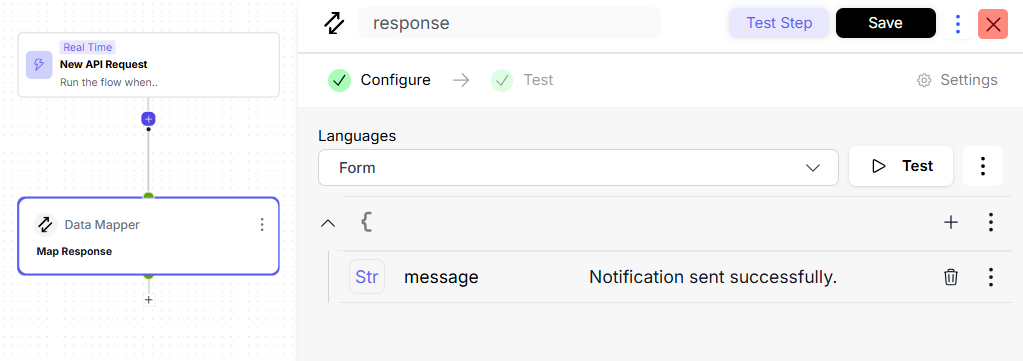
* This flow starts with an **On API Request** trigger.
* Inside this flow, you can:
  * Map values from the incoming error.
  * Alter the error message.
  * Optionally, add any other steps as needed.

<figure><img src="https://1255842839-files.gitbook.io/~/files/v0/b/gitbook-x-prod.appspot.com/o/spaces%2F3iSr2Tx8FvvuoLPncziH%2Fuploads%2FIJXIs50saq6YeTIrPLsP%2Fimage.png?alt=media&#x26;token=2752c8fb-7512-4b01-b713-bb147202c4ff" alt=""><figcaption></figcaption></figure>

* Save your changes.

**With this setup, you have control over how error messages are handled and displayed for your flow.**