# Setting Up a Redshift to GCS Migration Flow

## **1. Flow Trigger and Initialization**

<figure><img src="https://1255842839-files.gitbook.io/~/files/v0/b/gitbook-x-prod.appspot.com/o/spaces%2F3iSr2Tx8FvvuoLPncziH%2Fuploads%2FWlwTWCOI9M3c8HiEfKyK%2Fimage.png?alt=media&#x26;token=23aa9e91-1036-4b16-a9ba-0c9172553432" alt=""><figcaption></figcaption></figure>

### **i. Trigger on API Request**

The flow starts when an **API request** is received.\
This allows external systems to trigger the migration process on demand.

### **ii. Initialize Variables**

Sets up all **required variables** for the migration.\
This ensures the flow has the correct configuration and placeholders before processing begins.

<figure><img src="https://1255842839-files.gitbook.io/~/files/v0/b/gitbook-x-prod.appspot.com/o/spaces%2F3iSr2Tx8FvvuoLPncziH%2Fuploads%2F3AeoJb0pSSwEfGWB3wCx%2Fimage.png?alt=media&#x26;token=eed20e21-053b-46e2-ae86-10b263bcd71a" alt=""><figcaption></figcaption></figure>

***

## **2. Configuration Mapping**

### **Map Redshift Config**

Uses a **data mapping step** to pull Redshift connection details from the [RedshiftConfigFlow.](https://docs.fastn.ai/flows/tutorials/setting-up-an-aws-redshift-to-gcs-migration-widget#configuration-flow-redshift_to_gcs)\
This ensures the flow knows which database and credentials to use.

<figure><img src="https://1255842839-files.gitbook.io/~/files/v0/b/gitbook-x-prod.appspot.com/o/spaces%2F3iSr2Tx8FvvuoLPncziH%2Fuploads%2FdOkjZgrpnn4jYd8mF1Tw%2Fimage.png?alt=media&#x26;token=f5d02f19-c207-41f2-8214-25a45cd83e8a" alt=""><figcaption></figcaption></figure>

***

## **3. Create GCS Bucket**

### **GCS Bucket Creation**

The **Google Cloud Storage connector** creates a new bucket for the tenant.\
The bucket name is based on the mapped project ID, ensuring data isolation per tenant.

<figure><img src="https://1255842839-files.gitbook.io/~/files/v0/b/gitbook-x-prod.appspot.com/o/spaces%2F3iSr2Tx8FvvuoLPncziH%2Fuploads%2FXDuvh15BUsxILwEVXXQg%2Fimage.png?alt=media&#x26;token=26de550d-fb7f-4bc7-9b5a-b0da5679e835" alt=""><figcaption></figcaption></figure>

***

## **4. Loop Over Tables**

This section processes data for each table in your migration list.

<figure><img src="https://1255842839-files.gitbook.io/~/files/v0/b/gitbook-x-prod.appspot.com/o/spaces%2F3iSr2Tx8FvvuoLPncziH%2Fuploads%2FLgrXgZw7LII9oiOjJ9c9%2Fimage.png?alt=media&#x26;token=1af5076a-7e1d-429b-9f93-9d268e7abed9" alt=""><figcaption></figcaption></figure>

<figure><img src="https://1255842839-files.gitbook.io/~/files/v0/b/gitbook-x-prod.appspot.com/o/spaces%2F3iSr2Tx8FvvuoLPncziH%2Fuploads%2FU8ONBciU8pPW2xmGNwlN%2Fimage.png?alt=media&#x26;token=b0716e11-becf-471c-bf04-4ee259326ec1" alt=""><figcaption></figcaption></figure>

<figure><img src="https://1255842839-files.gitbook.io/~/files/v0/b/gitbook-x-prod.appspot.com/o/spaces%2F3iSr2Tx8FvvuoLPncziH%2Fuploads%2FK6Q7P1deKfVJiUW7m2Y0%2Fimage.png?alt=media&#x26;token=9f137d87-7155-43e4-a4c9-5c2ba29225ff" alt=""><figcaption></figcaption></figure>

### **i. Map Query Object**

Creates a **query object** containing the SQL query and output file name for the current table.\
This tells the flow what to fetch from Redshift.

<figure><img src="https://1255842839-files.gitbook.io/~/files/v0/b/gitbook-x-prod.appspot.com/o/spaces%2F3iSr2Tx8FvvuoLPncziH%2Fuploads%2FkRyDCPcZ89eL44Hl1md5%2Fimage.png?alt=media&#x26;token=fcd9cd9b-4847-493e-a870-67375d9b6449" alt=""><figcaption></figcaption></figure>

### **ii. Insert Item to Queries Variable**

Uses the **`insertItem` advanced action** to store the query in the `queries` variable.\
This variable will later be processed in the query execution loop.

<figure><img src="https://1255842839-files.gitbook.io/~/files/v0/b/gitbook-x-prod.appspot.com/o/spaces%2F3iSr2Tx8FvvuoLPncziH%2Fuploads%2FtUYJR1ccxo0evqDWfJHv%2Fimage.png?alt=media&#x26;token=6a11ed90-2923-411c-b645-b9f2430ae328" alt=""><figcaption></figcaption></figure>

<figure><img src="https://1255842839-files.gitbook.io/~/files/v0/b/gitbook-x-prod.appspot.com/o/spaces%2F3iSr2Tx8FvvuoLPncziH%2Fuploads%2FlImVkDdS6so9n7kjH0Nr%2Fimage.png?alt=media&#x26;token=2ccec934-e18c-49ed-9ec9-ed7012b4d850" alt=""><figcaption></figcaption></figure>

## **5. Security Check and Query Handling**

The next step after the Loop over Tables ends is the switch statement that checks for the query.

### **Switch: Query Provided?**

**If no query is provided**: Skip security checks and go directly to the **Loop Over Queries**.

<figure><img src="https://1255842839-files.gitbook.io/~/files/v0/b/gitbook-x-prod.appspot.com/o/spaces%2F3iSr2Tx8FvvuoLPncziH%2Fuploads%2FDeXBFxIfdu2LyRE5y2X9%2Fimage.png?alt=media&#x26;token=377e4178-bf85-4f75-9f72-297c4c9841c9" alt=""><figcaption></figcaption></figure>

#### **If a query is provided**: Perform a security review before running it.

#### **i. OpenAI Security Scan**

The **OpenAI connector** analyzes the provided query for potential **security risks**.\
This helps prevent unsafe or malicious SQL execution.

It has the command:

```
function handler(params) {
  content = `You are a security validator. Your only job is to analyze the provided SQL query and return whether it is secure or not. You must return a single JSON object with only one boolean field:

	{"allowed": true} if the query is secure,
	{"allowed": false} if the query has security risks such as SQL injection vulnerability, use of dynamic string concatenation, or unsafe operations.

	Return only the JSON. No other explanation, comments, or messages.
	validate this query ${params?.data.steps.getConfigs.output.query}
`
  return {
    "auth": {
      "bearerToken": "aliqui"
    },
    "body": {
      "messages": [{
        "role": "user",
        "content": content
      }],
      "model": "gpt-4"
    }
  }
}
```

#### **ii. Map Security Scan Output**

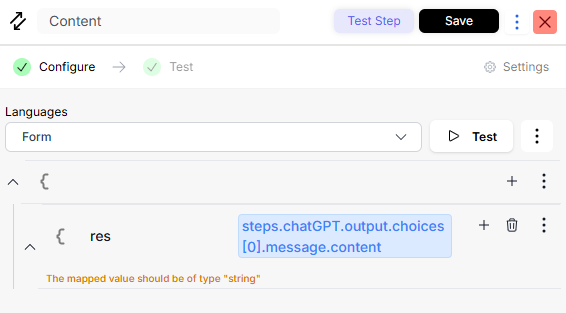
Maps the security scan results into a structured format for the next decision step.

<figure><img src="https://1255842839-files.gitbook.io/~/files/v0/b/gitbook-x-prod.appspot.com/o/spaces%2F3iSr2Tx8FvvuoLPncziH%2Fuploads%2F8iC2bY4MaRlfsmgYUPZD%2Fimage.png?alt=media&#x26;token=92a2f80e-58b0-41f9-9b6b-f60e83d83194" alt=""><figcaption></figcaption></figure>

#### **iii. Switch: Query Safe?**

* **If unsafe**: Returns an error message and stops execution.

<figure><img src="https://1255842839-files.gitbook.io/~/files/v0/b/gitbook-x-prod.appspot.com/o/spaces%2F3iSr2Tx8FvvuoLPncziH%2Fuploads%2Fjzga26SNTvJp2Gm2PgKu%2Fimage.png?alt=media&#x26;token=fe43f023-6069-4064-a365-81472e5260b0" alt=""><figcaption></figcaption></figure>

* **If safe**: Proceeds to map the custom query to a variable for execution.

<figure><img src="https://1255842839-files.gitbook.io/~/files/v0/b/gitbook-x-prod.appspot.com/o/spaces%2F3iSr2Tx8FvvuoLPncziH%2Fuploads%2FyhLiwKPRAulCqgbVtcJS%2Fimage.png?alt=media&#x26;token=185728f0-6803-434e-9787-83365aec6319" alt=""><figcaption></figcaption></figure>

#### **Store Safe Query**

Initializes the safe query variable using the `insertItem` advanced action.\
This prepares it for batch or single execution.

<figure><img src="https://1255842839-files.gitbook.io/~/files/v0/b/gitbook-x-prod.appspot.com/o/spaces%2F3iSr2Tx8FvvuoLPncziH%2Fuploads%2FPxDpssMlSZ8KlHNv2U1n%2Fimage.png?alt=media&#x26;token=9bac96e0-8afc-4665-b531-74c1981fcfe1" alt=""><figcaption></figcaption></figure>

<figure><img src="https://1255842839-files.gitbook.io/~/files/v0/b/gitbook-x-prod.appspot.com/o/spaces%2F3iSr2Tx8FvvuoLPncziH%2Fuploads%2FUENJBjukt9YkWRkNiIvw%2Fimage.png?alt=media&#x26;token=6dcc37f3-f0c0-483d-9122-ec2e07a1b815" alt=""><figcaption></figcaption></figure>

## **6. Loop Over Queries**

The output from the switch statement of whether thee query is provided or not is returned to this loop. This section handles executing queries and sending results to GCS.

<figure><img src="https://1255842839-files.gitbook.io/~/files/v0/b/gitbook-x-prod.appspot.com/o/spaces%2F3iSr2Tx8FvvuoLPncziH%2Fuploads%2Fku3MnKITPaOmBbZFoCsj%2Fimage.png?alt=media&#x26;token=ea2d3bc6-48dc-49be-bee8-f63e7d15ffd6" alt=""><figcaption></figcaption></figure>

<figure><img src="https://1255842839-files.gitbook.io/~/files/v0/b/gitbook-x-prod.appspot.com/o/spaces%2F3iSr2Tx8FvvuoLPncziH%2Fuploads%2FVRRuofAwx1pSUSuRwnVQ%2Fimage.png?alt=media&#x26;token=4536e34e-7cfe-4c79-be9d-b816b8d16d5e" alt=""><figcaption></figcaption></figure>

**Switch: Is Batching Enabled?**

**If yes**: Executes queries in smaller chunks to handle large datasets.

### **i. Batching Path**

#### **Initialize Batch Variables**

Sets `batchLoopIndex = 0` to track paging through results.

<figure><img src="https://1255842839-files.gitbook.io/~/files/v0/b/gitbook-x-prod.appspot.com/o/spaces%2F3iSr2Tx8FvvuoLPncziH%2Fuploads%2FPBVv9vTKx2K7MTEjGLR5%2Fimage.png?alt=media&#x26;token=294f936d-de17-492b-81d5-30915b0f0001" alt=""><figcaption></figcaption></figure>

#### **Infinity Loop for Batches**

Repeats until all data is processed.

<figure><img src="https://1255842839-files.gitbook.io/~/files/v0/b/gitbook-x-prod.appspot.com/o/spaces%2F3iSr2Tx8FvvuoLPncziH%2Fuploads%2FW5aKMbHZTL2aoV6E0kav%2Fimage.png?alt=media&#x26;token=a935cb3e-3c3d-4e15-a3f7-e9951315f9a5" alt=""><figcaption></figcaption></figure>

#### **Inside Infinity Loop:**

<figure><img src="https://1255842839-files.gitbook.io/~/files/v0/b/gitbook-x-prod.appspot.com/o/spaces%2F3iSr2Tx8FvvuoLPncziH%2Fuploads%2Fo2yiaMQ6a5xJDS27cGVQ%2Fimage.png?alt=media&#x26;token=812d8e3a-3cb2-41e3-9b66-2e932503714f" alt=""><figcaption></figcaption></figure>

1. **Remove Semicolons (JS Code)** – Ensures queries are clean before execution.

```
function handler(params) {
  const query = params?.data.steps.loopOverQueries.loopOverItem.query;
  
  return {
    query: query.replace(/;$/, '')
  };
}
```

2. **Map Base Query with Offset** – Adds `LIMIT` and `OFFSET` for pagination.

<figure><img src="https://1255842839-files.gitbook.io/~/files/v0/b/gitbook-x-prod.appspot.com/o/spaces%2F3iSr2Tx8FvvuoLPncziH%2Fuploads%2FlZpOCmdlrCU18dJVgABS%2Fimage.png?alt=media&#x26;token=3da8004e-7c86-4e7d-bf79-f0ddee5dc897" alt=""><figcaption></figcaption></figure>

<figure><img src="https://1255842839-files.gitbook.io/~/files/v0/b/gitbook-x-prod.appspot.com/o/spaces%2F3iSr2Tx8FvvuoLPncziH%2Fuploads%2FBTV8h2UIQlKPMSMhSDCx%2Fimage.png?alt=media&#x26;token=24f60814-b2fe-4c22-921c-70ee753bc7a7" alt=""><figcaption></figcaption></figure>

3. **Execute Query (AWS Redshift)** – Runs the SQL against Redshift with batching parameters.

<figure><img src="https://1255842839-files.gitbook.io/~/files/v0/b/gitbook-x-prod.appspot.com/o/spaces%2F3iSr2Tx8FvvuoLPncziH%2Fuploads%2FhdFAwHSptNR8mICmTRYb%2Fimage.png?alt=media&#x26;token=5eba3186-69af-4af0-922c-8baae6302f81" alt=""><figcaption></figcaption></figure>

4. **Switch: Execution Failed?** – Returns an error if execution fails.

<figure><img src="https://1255842839-files.gitbook.io/~/files/v0/b/gitbook-x-prod.appspot.com/o/spaces%2F3iSr2Tx8FvvuoLPncziH%2Fuploads%2FP3L6COlB4mtHkjhJ9Dt7%2Fimage.png?alt=media&#x26;token=05383996-fd63-44d0-b40d-ecf15fa4aace" alt=""><figcaption></figcaption></figure>

<figure><img src="https://1255842839-files.gitbook.io/~/files/v0/b/gitbook-x-prod.appspot.com/o/spaces%2F3iSr2Tx8FvvuoLPncziH%2Fuploads%2FK32avFEjzO5LGVbfvzXW%2Fimage.png?alt=media&#x26;token=711450a9-1d61-4dc9-b2ae-6bd77858bcf2" alt=""><figcaption></figcaption></figure>

5. **Increment Batch Index** – Updates the offset for the next batch.

<figure><img src="https://1255842839-files.gitbook.io/~/files/v0/b/gitbook-x-prod.appspot.com/o/spaces%2F3iSr2Tx8FvvuoLPncziH%2Fuploads%2FXTLR4NF0qBQHjuz5i24y%2Fimage.png?alt=media&#x26;token=d7d67910-8a4e-4fd8-87e5-5e482739b008" alt=""><figcaption></figcaption></figure>

<figure><img src="https://1255842839-files.gitbook.io/~/files/v0/b/gitbook-x-prod.appspot.com/o/spaces%2F3iSr2Tx8FvvuoLPncziH%2Fuploads%2FDgYemezOGjkG83yMoJ4b%2Fimage.png?alt=media&#x26;token=a2e55a02-454d-40a3-ac1d-abc92f30dfe4" alt=""><figcaption></figcaption></figure>

6. **Map Batch Results** – Formats results for GCS upload.

<figure><img src="https://1255842839-files.gitbook.io/~/files/v0/b/gitbook-x-prod.appspot.com/o/spaces%2F3iSr2Tx8FvvuoLPncziH%2Fuploads%2FCZJV1VGxiwgRLS6SCavO%2Fimage.png?alt=media&#x26;token=b9560c30-1a17-4efd-96fd-3140b7014999" alt=""><figcaption></figcaption></figure>

7. **Switch: Results Empty?** – Ends the loop if no more data.

<figure><img src="https://1255842839-files.gitbook.io/~/files/v0/b/gitbook-x-prod.appspot.com/o/spaces%2F3iSr2Tx8FvvuoLPncziH%2Fuploads%2F4XydmA650RfER4qU2bUv%2Fimage.png?alt=media&#x26;token=932c21f1-cef2-485a-b58e-afdc06ae6586" alt=""><figcaption></figcaption></figure>

<figure><img src="https://1255842839-files.gitbook.io/~/files/v0/b/gitbook-x-prod.appspot.com/o/spaces%2F3iSr2Tx8FvvuoLPncziH%2Fuploads%2FfIw1MW8C8yTD4Kz3Z2cl%2Fimage.png?alt=media&#x26;token=ab5d85b2-d706-4eba-81f8-abd372ac3591" alt=""><figcaption></figcaption></figure>

8. **Upload to GCS** – Sends the batch results to the tenant’s GCS bucket.

<figure><img src="https://1255842839-files.gitbook.io/~/files/v0/b/gitbook-x-prod.appspot.com/o/spaces%2F3iSr2Tx8FvvuoLPncziH%2Fuploads%2F61xcAG8i8fdpW6mS4uOu%2Fimage.png?alt=media&#x26;token=c3e07d52-4975-4e12-8905-9ecd0ba3a767" alt=""><figcaption></figcaption></figure>

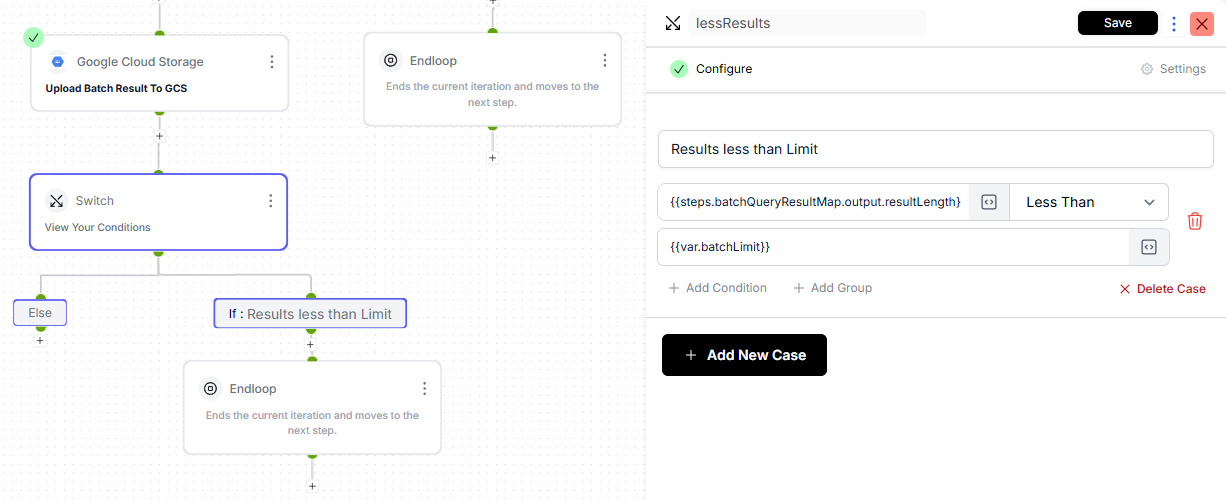
9. **Switch: Last Batch?** – Ends the loop if the batch is smaller than the limit else, the iteration continues.

<figure><img src="https://1255842839-files.gitbook.io/~/files/v0/b/gitbook-x-prod.appspot.com/o/spaces%2F3iSr2Tx8FvvuoLPncziH%2Fuploads%2Fp1w521lvGEDB5QeiEGTS%2Fimage.png?alt=media&#x26;token=4070064f-f6ca-40c0-a3f1-3de2b4c5628a" alt=""><figcaption></figcaption></figure>

<figure><img src="https://1255842839-files.gitbook.io/~/files/v0/b/gitbook-x-prod.appspot.com/o/spaces%2F3iSr2Tx8FvvuoLPncziH%2Fuploads%2FcRQRxt2r7rBz8uX5Z4SB%2Fimage.png?alt=media&#x26;token=e7ef22d6-a82f-44f8-ad8a-f12bcaa66d41" alt=""><figcaption></figcaption></figure>

### **ii. Non-Batching Path**

<figure><img src="https://1255842839-files.gitbook.io/~/files/v0/b/gitbook-x-prod.appspot.com/o/spaces%2F3iSr2Tx8FvvuoLPncziH%2Fuploads%2F3r38PmXidxzEcXFuKycj%2Fimage.png?alt=media&#x26;token=6b8dc52b-2817-4bf5-a20c-0f51b0a7a09d" alt=""><figcaption></figcaption></figure>

1. **Execute Query (AWS Redshift)** – Runs the full query without pagination.

<figure><img src="https://1255842839-files.gitbook.io/~/files/v0/b/gitbook-x-prod.appspot.com/o/spaces%2F3iSr2Tx8FvvuoLPncziH%2Fuploads%2FpdhD6c1P9eJpl2cjSxHm%2Fimage.png?alt=media&#x26;token=56be6a04-cf23-40b7-8139-e9a9f456f91c" alt=""><figcaption></figcaption></figure>

2. **Switch: Execution Failed?** – Returns an error if query execution fails.

<figure><img src="https://1255842839-files.gitbook.io/~/files/v0/b/gitbook-x-prod.appspot.com/o/spaces%2F3iSr2Tx8FvvuoLPncziH%2Fuploads%2FuDP5sjlH6rpNtalSEcKF%2Fimage.png?alt=media&#x26;token=fe742c65-9fd8-40b4-8a90-31c31a74b246" alt=""><figcaption></figcaption></figure>

**Else: Upload Results to GCS** – Sends the complete result set to the tenant’s GCS bucket.

<figure><img src="https://1255842839-files.gitbook.io/~/files/v0/b/gitbook-x-prod.appspot.com/o/spaces%2F3iSr2Tx8FvvuoLPncziH%2Fuploads%2Fbfn5PaAt1ftANoisib2N%2Fimage.png?alt=media&#x26;token=6bf04bdd-9cec-439e-ae17-491298f09f01" alt=""><figcaption></figcaption></figure>

***

### **7. Completion**

#### **Return Success Message**

Once all queries are processed and results are uploaded, the main flow returns a **success response**.\
This confirms that the migration is complete.

<figure><img src="https://1255842839-files.gitbook.io/~/files/v0/b/gitbook-x-prod.appspot.com/o/spaces%2F3iSr2Tx8FvvuoLPncziH%2Fuploads%2FKdEd3DKPvsf6PfQm1ME5%2Fimage.png?alt=media&#x26;token=38095dd8-2711-4cfa-9435-753e61691b60" alt=""><figcaption></figcaption></figure>