# Setting Up a Google Drive to GCS Migration Flow

## **1. Start the Flow**

You can start the flow by selecting **New API Request** as the trigger.

![Flow trigger step configured with New API Request as the starting point](https://1255842839-files.gitbook.io/~/files/v0/b/gitbook-x-prod.appspot.com/o/spaces%2F3iSr2Tx8FvvuoLPncziH%2Fuploads%2FCyDP5Wbx6PdKGZ5kLp0B%2Fimage.png?alt=media\&token=2508c435-2edc-422f-9b86-e28308393daa)<br>

### Initiate Your Flow Variables

When the flow starts, the following important variables are initialized:

<figure><img src="https://1255842839-files.gitbook.io/~/files/v0/b/gitbook-x-prod.appspot.com/o/spaces%2F3iSr2Tx8FvvuoLPncziH%2Fuploads%2FuJhpcDrXnxmwYiM3FvAD%2Fimage.png?alt=media&#x26;token=b1558b1d-4c29-4115-98e7-7584126bbbef" alt="Flow variables initialization step with MIME handling for Docs, Sheets, Slides, and Drawings"><figcaption></figcaption></figure>

{% hint style="info" %}
You also define MIME handling for Docs, Sheets, Slides, and Drawings so that Google-native files can be exported in the correct format during migration.
{% endhint %}

***

## **2. Configure Drive and GCS Settings**

### Map Get Configs

The next step maps values from your [**DriveConfigFlow** ](https://docs.fastn.ai/flows/tutorials/setting-up-a-google-drive-to-gcs-migration-widget#configuration-flow-drive_to_gcs)so the flow has all required tenant and bucket details.<br>

<figure><img src="https://1255842839-files.gitbook.io/~/files/v0/b/gitbook-x-prod.appspot.com/o/spaces%2F3iSr2Tx8FvvuoLPncziH%2Fuploads%2FJBQs5QwMcIfoMW5ePR24%2Fimage.png?alt=media&#x26;token=6a93d1d5-d5f5-4036-9d43-bec89234686c" alt="Data mapping step pulling tenant and bucket details from DriveConfigFlow"><figcaption></figcaption></figure>

### Create Bucket for Tenant

Once these values are ready, you can use the Google Cloud Storage connector to create a **bucket for the tenant** if it doesn’t already exist.

<figure><img src="https://1255842839-files.gitbook.io/~/files/v0/b/gitbook-x-prod.appspot.com/o/spaces%2F3iSr2Tx8FvvuoLPncziH%2Fuploads%2FSzu8FIa8toP57oUbUzQB%2Fimage.png?alt=media&#x26;token=d6971f3b-a650-44d1-89c9-597f6ce91b39" alt="Google Cloud Storage connector step creating a bucket for the tenant"><figcaption></figcaption></figure>

***

## **3. Set the File Path Rules**

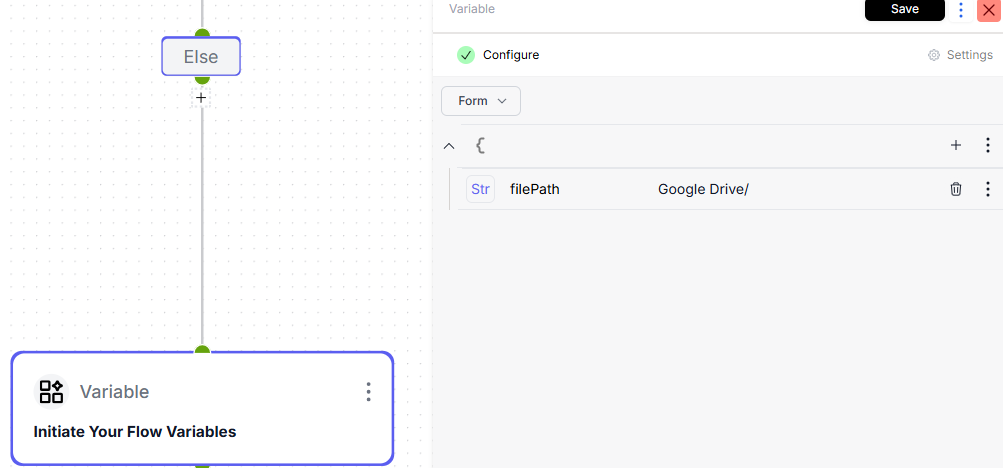
You will then hit a **Switch** step that determines how the `filePath` variable is set:

<figure><img src="https://1255842839-files.gitbook.io/~/files/v0/b/gitbook-x-prod.appspot.com/o/spaces%2F3iSr2Tx8FvvuoLPncziH%2Fuploads%2FimG5SdSojawHfhn18XJK%2Fimage.png?alt=media&#x26;token=1f30b23d-253d-4093-b404-b35804e237f4" alt="Switch step determining how the filePath variable is set"><figcaption></figcaption></figure>

* If `baseFilePath` is provided → set `filePath` = `{{var.baseFilePath}}`

<figure><img src="https://1255842839-files.gitbook.io/~/files/v0/b/gitbook-x-prod.appspot.com/o/spaces%2F3iSr2Tx8FvvuoLPncziH%2Fuploads%2FVIEalpYvHc3yyTsibRV1%2Fimage.png?alt=media&#x26;token=ceedc185-62e2-4a26-bd40-60a7be7b53e6" alt="Setting filePath to baseFilePath when baseFilePath is provided"><figcaption></figcaption></figure>

* If `separateFoldersForUsers` is `true` → set `filePath` per tenant/user

<figure><img src="https://1255842839-files.gitbook.io/~/files/v0/b/gitbook-x-prod.appspot.com/o/spaces%2F3iSr2Tx8FvvuoLPncziH%2Fuploads%2FsMV4JDAk5fXIP2VTpnkR%2Fimage.png?alt=media&#x26;token=4d652717-3db7-40f4-a9f3-e3095fd61abe" alt="Setting filePath per tenant and user when separateFoldersForUsers is true"><figcaption></figcaption></figure>

* Else → set `filePath` = `"Google Drive"`

<figure><img src="https://1255842839-files.gitbook.io/~/files/v0/b/gitbook-x-prod.appspot.com/o/spaces%2F3iSr2Tx8FvvuoLPncziH%2Fuploads%2FOx9i9I5BBGd9lD3oxSMJ%2Fimage.png?alt=media&#x26;token=d2baf5a6-aa63-4eb6-88e2-7401676541dd" alt="Default case setting filePath to Google Drive"><figcaption></figcaption></figure>

From here, you move into the **Loop Over Input** step.

***

## **4. Loop Over Input Items**

<figure><img src="https://1255842839-files.gitbook.io/~/files/v0/b/gitbook-x-prod.appspot.com/o/spaces%2F3iSr2Tx8FvvuoLPncziH%2Fuploads%2F3RsTC3yrDrZ2yWgLRlwa%2Fimage.png?alt=media&#x26;token=6816805a-2eef-45c2-b1fe-ef35fc8dac6e" alt="Loop Over Input step iterating through the list of file IDs"><figcaption></figcaption></figure>

For each item in your incoming list of file IDs:

* Use the Google Drive connector with **getFile**
  * `File ID` = `{{steps.loopOverInput.loopOverItem.value}}`
  * `param.fields` = `id,name,mimeType,modifiedTime`

<figure><img src="https://1255842839-files.gitbook.io/~/files/v0/b/gitbook-x-prod.appspot.com/o/spaces%2F3iSr2Tx8FvvuoLPncziH%2Fuploads%2F7u2iC1nkYTip20RWqy0C%2Fimage.png?alt=media&#x26;token=e336f9e9-11cf-47f6-9f82-20a8adb9b508" alt="Google Drive connector getFile action configured with File ID and fields parameters"><figcaption></figcaption></figure>

* Initialize `fileObject` from `loopOverItem`

<figure><img src="https://1255842839-files.gitbook.io/~/files/v0/b/gitbook-x-prod.appspot.com/o/spaces%2F3iSr2Tx8FvvuoLPncziH%2Fuploads%2FB9MatCdYwpMx1eJAqP50%2Fimage.png?alt=media&#x26;token=faeceb57-cc38-446a-ab61-0e206562f0d5" alt="Initializing fileObject variable from the loopOverItem value"><figcaption></figcaption></figure>

* Append this file object to the `files` array using the advanced action **insertItem**.

{% hint style="info" %}
You can click the three-dots next to your variable to setup or edit the advanced action selected.
{% endhint %}

<figure><img src="https://1255842839-files.gitbook.io/~/files/v0/b/gitbook-x-prod.appspot.com/o/spaces%2F3iSr2Tx8FvvuoLPncziH%2Fuploads%2FZnZHaah0jDnza6d29Vft%2Fimage.png?alt=media&#x26;token=d5ee79c4-88ed-423a-86a0-f64095e6f1f8" alt="Appending file object to the files array using the insertItem advanced action"><figcaption></figcaption></figure>

***

## **5. Loop Over Files**

After the Loop Over Input ends, the next step will be a loop that runs until all files are processed.

**i. Initialize Loop Counters and Variables**

<figure><img src="https://1255842839-files.gitbook.io/~/files/v0/b/gitbook-x-prod.appspot.com/o/spaces%2F3iSr2Tx8FvvuoLPncziH%2Fuploads%2FHAW8ckZ7vOIVA3sXRscO%2Fimage.png?alt=media&#x26;token=dd938e8f-352c-41ee-97c3-6708b00f831e" alt="Initializing loop counters and variables for file processing"><figcaption></figcaption></figure>

* **Data Mapper:** `fileLength = arrayLength(var.files)` ; total files in the queue.

<figure><img src="https://1255842839-files.gitbook.io/~/files/v0/b/gitbook-x-prod.appspot.com/o/spaces%2F3iSr2Tx8FvvuoLPncziH%2Fuploads%2Fi2gfv8RD70ppiPYQtPmb%2Fimage.png?alt=media&#x26;token=4bb4480f-10e1-47c3-9345-03cd3c0b36be" alt="Data mapper setting fileLength to the array length of the files variable"><figcaption></figcaption></figure>

#### Switch Statement

* If no files remain, exit the loop.
* Else, set:

  * `currentFile = {{var.files[0]}}` , the file you’ll process now.

  <figure><img src="https://1255842839-files.gitbook.io/~/files/v0/b/gitbook-x-prod.appspot.com/o/spaces%2F3iSr2Tx8FvvuoLPncziH%2Fuploads%2FZHzjU47G2PuCYREQNBYL%2Fimage.png?alt=media&#x26;token=f01e03ec-8d56-45f8-80d9-e1cde18a3432" alt="Setting currentFile to the first item in the files array"><figcaption></figcaption></figure>

  * Remove the first item from `var.files` using `removeItem`.

<figure><img src="https://1255842839-files.gitbook.io/~/files/v0/b/gitbook-x-prod.appspot.com/o/spaces%2F3iSr2Tx8FvvuoLPncziH%2Fuploads%2FIbRWoitBqe8DalHRwPFx%2Fimage.png?alt=media&#x26;token=a01a6b8d-c0c7-453b-a165-85ec5815354a" alt="Removing the first item from the files array using removeItem action"><figcaption></figcaption></figure>

**ii. Switch Statement to Check If Current File is a Folder**

<figure><img src="https://1255842839-files.gitbook.io/~/files/v0/b/gitbook-x-prod.appspot.com/o/spaces%2F3iSr2Tx8FvvuoLPncziH%2Fuploads%2FpGfJGERD5CjRp2w9NLxV%2Fimage.png?alt=media&#x26;token=622bf6b2-6127-4916-8f3a-c838f0749c7d" alt="Switch step checking if the current file is a folder based on mimeType"><figcaption></figcaption></figure>

* If `currentFile.mimeType` indicates a folder:

  * Call **Google Drive Connector** with action to **getFilesFromFolder** with:

    * `param.q = '{{var.currentFile.file.id}}' in parents`
    * `param.fields = files(id,name,mimeType,modifiedTime)`

    <figure><img src="https://1255842839-files.gitbook.io/~/files/v0/b/gitbook-x-prod.appspot.com/o/spaces%2F3iSr2Tx8FvvuoLPncziH%2Fuploads%2Fa77ZeyMfVfzTRL8mePp7%2Fimage.png?alt=media&#x26;token=b99a42e7-f082-402d-9933-7c3c02624937" alt="Google Drive connector getFilesFromFolder action with parent ID and fields parameters"><figcaption></figcaption></figure>
  * Append each returned file to `var.files` so they’re picked up in the same loop.

  <figure><img src="https://1255842839-files.gitbook.io/~/files/v0/b/gitbook-x-prod.appspot.com/o/spaces%2F3iSr2Tx8FvvuoLPncziH%2Fuploads%2Febs1cuGgglI9Eg7U1lMj%2Fimage.png?alt=media&#x26;token=ad202f8e-377a-4ac2-99e6-264aaae69c2a" alt="Appending folder contents to the files array for processing in the loop"><figcaption></figcaption></figure>

<figure><img src="https://1255842839-files.gitbook.io/~/files/v0/b/gitbook-x-prod.appspot.com/o/spaces%2F3iSr2Tx8FvvuoLPncziH%2Fuploads%2FFfOPFaDMAyugBcTUljAt%2Fimage.png?alt=media&#x26;token=9d5560c8-88f6-4f46-92fc-ccee055febbc" alt="Loop configuration for processing files within a folder"><figcaption></figcaption></figure>

<figure><img src="https://1255842839-files.gitbook.io/~/files/v0/b/gitbook-x-prod.appspot.com/o/spaces%2F3iSr2Tx8FvvuoLPncziH%2Fuploads%2FTcGyceU6tCPpkuvibYgz%2Fimage.png?alt=media&#x26;token=445bc39e-a01e-4a2c-823a-502bd342b83e" alt="Variable mapping for folder file insertion into the processing queue"><figcaption></figcaption></figure>

**Non-Folder Files**

* Build a **state key** for this file:

<figure><img src="https://1255842839-files.gitbook.io/~/files/v0/b/gitbook-x-prod.appspot.com/o/spaces%2F3iSr2Tx8FvvuoLPncziH%2Fuploads%2F9cMcbaEaSch67XAqtAce%2Fimage.png?alt=media&#x26;token=ebf3e780-4e43-4005-9e07-0feca17f12d7" alt="Building a state key for the current file to track processing status"><figcaption></figcaption></figure>

* **Read State** for `stateKey` to check if the file is already processed or unchanged.

  <figure><img src="https://1255842839-files.gitbook.io/~/files/v0/b/gitbook-x-prod.appspot.com/o/spaces%2F3iSr2Tx8FvvuoLPncziH%2Fuploads%2FrdaK8y4FgQd89FR0hglx%2Fimage.png?alt=media&#x26;token=9d266947-3d64-40f6-bdb6-ab1c5504af64" alt="Reading state for stateKey to check if the file was already processed"><figcaption></figcaption></figure>

#### iii. Switch Step to Check if Files are Updated

Next Step is a switch statement that checks if files are updated, and ends the flow if there is no update.

<figure><img src="https://1255842839-files.gitbook.io/~/files/v0/b/gitbook-x-prod.appspot.com/o/spaces%2F3iSr2Tx8FvvuoLPncziH%2Fuploads%2F39inEDDcQMaMZtYZX9cU%2Fimage.png?alt=media&#x26;token=5ef1711b-48dd-4245-ae84-64e9e36927bc" alt="Switch step checking if files have been updated since last processing"><figcaption></figcaption></figure>

If the file is updated,

* Run **gettingMimeType** JS step → detect MIME type and extension.

```
function handler(params) {
  const mimeTypes = params?.data.var.mimeTypes;
  const fileMimeTypes = params?.data.var.currentFile.file.metadata?.mimeType;

  for (let i = 0; i < mimeTypes.length; i++) {
    if (mimeTypes[i].googleMimeType === fileMimeTypes) {
      return {
        mimeType: mimeTypes[i].exportableMimeTypes,
        extension: mimeTypes[i].exportablExtension
      };
    }
  }
```

* Run **preparingParams** JS step → prepare download/export URLs.

```
function handler(params) {
  const fileId = params?.data.var.currentFile.file.value;
  let fileNamePrefix = '';
  if (params?.data.input.overrideFiles === false) {
    fileNamePrefix = Date.now() + '_';
  }

  return {
    googleUrl: 'https://www.googleapis.com/drive/v3/files/' + fileId + '/export?mimeType=' + params?.data.steps.gettingMimeType.output.mimeType,
    nonGoogleUrl: 'https://www.googleapis.com/drive/v3/files/' + fileId + '?alt=media',
    fileNamePrefix
  };
}
```

* Get access token from **Fastn Connector** using the action **getConnectorToken**.

<figure><img src="https://1255842839-files.gitbook.io/~/files/v0/b/gitbook-x-prod.appspot.com/o/spaces%2F3iSr2Tx8FvvuoLPncziH%2Fuploads%2FlgAyiDub4SFINujzAfNt%2Fimage.png?alt=media&#x26;token=abb5c49c-2b60-465c-b777-7bac93c6f6c0" alt="Fastn connector getConnectorToken action retrieving an access token"><figcaption></figcaption></figure>

**iv. Decide How to Download (Switch Step)**

<figure><img src="https://1255842839-files.gitbook.io/~/files/v0/b/gitbook-x-prod.appspot.com/o/spaces%2F3iSr2Tx8FvvuoLPncziH%2Fuploads%2FLnz8WkoQdIuEbEUgTau7%2Fimage.png?alt=media&#x26;token=dff12707-a50a-430d-954a-df30c8fa97f5" alt="Switch step deciding download method based on Google-native or non-Google file type"><figcaption></figcaption></figure>

* **If Google-native file (Docs, Sheets, Slides, Drawings):**

  <figure><img src="https://1255842839-files.gitbook.io/~/files/v0/b/gitbook-x-prod.appspot.com/o/spaces%2F3iSr2Tx8FvvuoLPncziH%2Fuploads%2FapM1fODikiuZ8yhMw07G%2Fimage.png?alt=media&#x26;token=507e2920-feb9-44d9-a015-6466462dc8b4" alt="Configuration for downloading Google-native files like Docs, Sheets, and Slides"><figcaption></figcaption></figure>
* **Else (non-Google file):**

  <figure><img src="https://1255842839-files.gitbook.io/~/files/v0/b/gitbook-x-prod.appspot.com/o/spaces%2F3iSr2Tx8FvvuoLPncziH%2Fuploads%2FEUjZFrKhdujj7s3qJb4Z%2Fimage.png?alt=media&#x26;token=352ea32e-0841-4d21-8fe9-b9dc9c6b0b0e" alt="Configuration for downloading non-Google files using direct media URL"><figcaption></figcaption></figure>

**v. Download from Drive**

* For both types of files, the variables that are initialized will connect to the flow component **Download file** where you can download these files.

  <figure><img src="https://1255842839-files.gitbook.io/~/files/v0/b/gitbook-x-prod.appspot.com/o/spaces%2F3iSr2Tx8FvvuoLPncziH%2Fuploads%2FQUxAZJtleT8Vui0OG3og%2Fimage.png?alt=media&#x26;token=f5f9ed2d-1ded-49df-853e-7d21a0e5348d" alt="Download file flow component that downloads files from Google Drive"><figcaption></figcaption></figure>

**vi. Upload to Google Cloud Storage**

* In the next step, you will use the **Google Cloud Storage** connector with the action **uploadFileToGCS** with your target bucket and `fileName`.

<figure><img src="https://1255842839-files.gitbook.io/~/files/v0/b/gitbook-x-prod.appspot.com/o/spaces%2F3iSr2Tx8FvvuoLPncziH%2Fuploads%2FugtyvAd8XcSVwpgJDIwX%2Fimage.png?alt=media&#x26;token=b55a39a7-807c-4b39-8b3e-c61dcb0b3e18" alt="Google Cloud Storage connector uploadFileToGCS action with target bucket and fileName"><figcaption></figcaption></figure>

**vii. Update File State**

* In the next step, you will use the State component to overwrite the State for StateKey depending on the updates.

<figure><img src="https://1255842839-files.gitbook.io/~/files/v0/b/gitbook-x-prod.appspot.com/o/spaces%2F3iSr2Tx8FvvuoLPncziH%2Fuploads%2FHGdpPod3qWxYi9wTe5Yf%2Fimage.png?alt=media&#x26;token=5af8c958-6d77-496f-87b2-be7f1e1838f3" alt="State component overwriting the stateKey value after file upload"><figcaption></figcaption></figure>

* Loop picks up next `currentFile` and continues until `var.files` is empty.

***

## **6. Finish the Migration**

The loop continues until all files are processed.\
When complete, the main flow returns a success message confirming the migration.

<figure><img src="https://1255842839-files.gitbook.io/~/files/v0/b/gitbook-x-prod.appspot.com/o/spaces%2F3iSr2Tx8FvvuoLPncziH%2Fuploads%2FXO0dSyrIpehPA29MoCV2%2Fimage.png?alt=media&#x26;token=40d332ac-2392-4876-9e01-0949b10d8f55" alt="Flow returning a success message confirming the migration is complete"><figcaption></figcaption></figure>