> For the complete documentation index, see [llms.txt](https://docs.fastn.ai/llms.txt). Markdown versions of documentation pages are available by appending `.md` to page URLs; this page is available as [Markdown](https://docs.fastn.ai/embed/embedding.md).
# Embedding the widget
Three ways to put the widget in your product, and how to hand it a token safely.
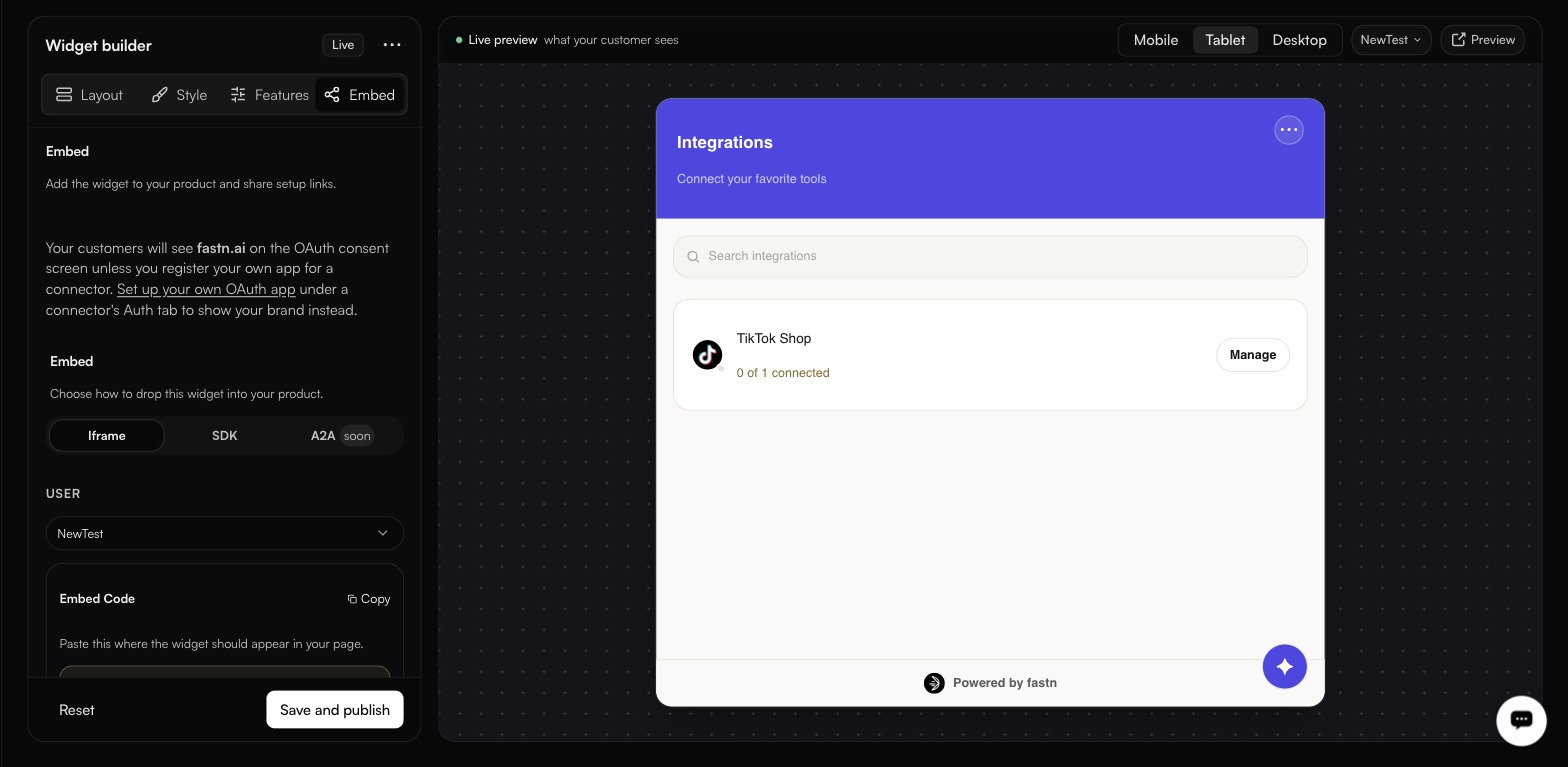
**Widgets → Embed**
The preview follows the selected user, pick one and the panel shows that customer's real connection state, not a mock-up.
## Pick the customer first
The widget is always scoped to **one** of your customers, so the **USER** dropdown at the top is not a preview toggle. It decides who the generated snippet is for.
The dropdown lists the customers on your account, by their identifier, for example `test-tenant`. Selecting one does two things at once:
* the preview beside it shows **that customer's real connection state**, not a mock-up, so `TikTok Shop, 0 of 1 connected` is the truth for that customer
* the **Embed Code** block regenerates with a token scoped to them
If the dropdown is empty, you have no customers yet. Create one under [Customers](/operate/customers.md) first.
Then choose how to mount it.
| Method | Requirement | Status |
| ---------- | ------------------------- | ----------- |
| **Iframe** | Anywhere you control HTML | Available |
| **SDK** | You can run JavaScript | Available |
| **A2A** | Agent-to-agent | Coming soon |
{% hint style="danger" %}
**The snippet on this tab contains a live token.** It is there so you can paste it and see the widget working in seconds, and it is not safe for production: anyone with the URL can act as that customer until the token expires.
For production, mint short-lived tokens from your backend and keep them out of the URL. The [SDK](/embed/embedding/sdk.md) is built for that pattern, and the [Token API](/embed/embedding/token-api.md) is how you mint them.
{% endhint %}
## Shareable links
Instead of a snippet, send a link. It keeps working until you revoke it, and the URL carries no token.
{% hint style="warning" %}
The reference in a shareable link *is* the credential. Treat the link itself as a secret: anyone who has it can act as that customer.
{% endhint %}
Create links per customer under **Shareable links** on the Embed tab. Each row offers **Copy**, **Show** and **Revoke**.
A shareable link suits the cases where you cannot embed at all: onboarding a customer before they have access to your product, letting someone connect their accounts from an email, or handing a link to a customer's IT team to authorise on their behalf. **Revoke** is immediate, and it is the only way to withdraw one.
### In this section
* [Iframe](/embed/embedding/iframe.md)
* [SDK](/embed/embedding/sdk.md)
* [Token API](/embed/embedding/token-api.md)
* [Integration flow](/embed/embedding/integration-flow.md)
---
# Agent Instructions
This documentation is published with GitBook. GitBook is the documentation platform designed so that both humans and AI agents can read, navigate, and reason over technical content effectively. Learn more at gitbook.com.
## Querying This Documentation
If you need additional information that is not directly available in this page, you can query the documentation by asking a question.
Perform an HTTP GET request on the following URL with the `ask` and `goal` query parameters:
```
GET https://docs.fastn.ai/embed/embedding.md?ask=&goal=
```
`ask` is the immediate question: it should be specific, self-contained, and written in natural language.
`goal` is what the user is ultimately trying to achieve, the reason they need the answer. Sharing it helps GitBook give you a better, more relevant answer. A goal is most helpful when it describes the outcome the user wants rather than restating the question. For example, with `ask=how do I create an API token`, a goal like `automate deployments from our CI pipeline` lets GitBook tailor the answer to that use case.
The response will contain a direct answer to the question and relevant excerpts and sources from the documentation.
Use this mechanism when the answer is not explicitly present in the current page, you need clarification or additional context, or you want to retrieve related documentation sections.