> For the complete documentation index, see [llms.txt](https://docs.fastn.ai/llms.txt). Markdown versions of documentation pages are available by appending `.md` to page URLs; this page is available as [Markdown](https://docs.fastn.ai/build/workflows.md).

# Workflows

The code that runs on a trigger, a schedule, or an agent call.

**Integrations → Workflows** · `/integrations?tab=workflows`

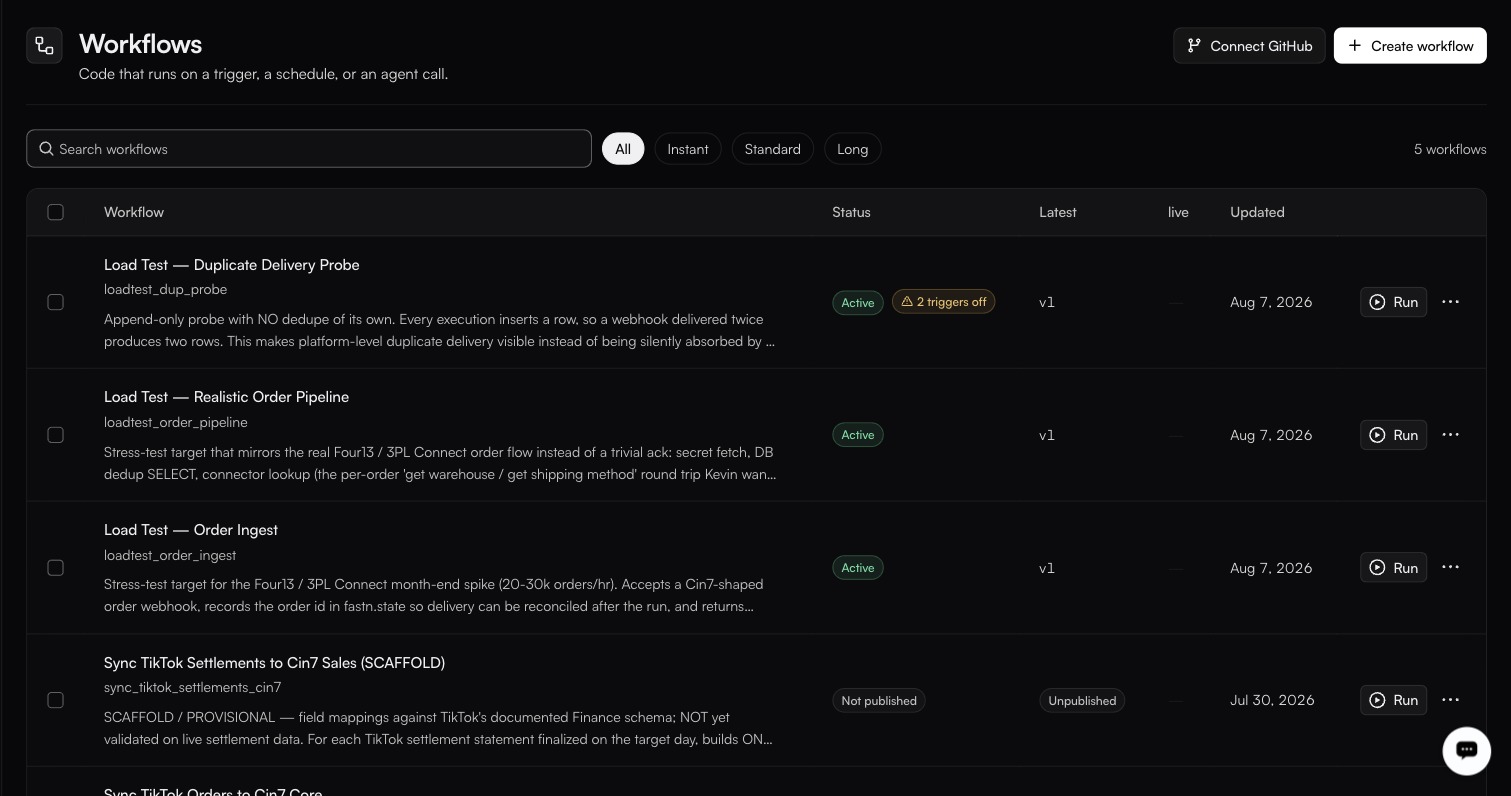
<figure><img src="https://1255842839-files.gitbook.io/~/files/v0/b/gitbook-x-prod.appspot.com/o/spaces%2F3iSr2Tx8FvvuoLPncziH%2Fuploads%2Fgit-blob-e4961713aeba623ec6593e4dfcbd0116f07fa697%2Fworkflows-list.jpg?alt=media" alt="5 workflows under Workflow, Status, Latest, live and Updated: three Load Test rows Active at v1, one badged 2 triggers off, and sync_tiktok_settlements_cin7 Not published and Unpublished"><figcaption><p>Connect GitHub and Create workflow sit top-right; the pills filter by execution tier. Every row's <strong>live</strong> cell is an em dash, nothing is deployed.</p></figcaption></figure>

A workflow is JavaScript. One file, `<slug>.js`, exporting one function:

```javascript
export default async function (ctx) {
  // ctx.input, ctx.headers, ctx.connectors
}
```

There is no node palette and no drag-and-drop step builder. Everything else on this screen configures, describes, tests or deploys that function.

### The list

| Column          | Notes                                                               |
| --------------- | ------------------------------------------------------------------- |
| checkbox        | Selects rows.                                                       |
| **Workflow**    | Name, slug and description.                                         |
| **Status**      | `Active` or `Not published`.                                        |
| **Latest**      | `v2`, or `Unpublished` when no snapshot exists yet.                 |
| **live**        | Which version is deployed to the live environment, if any.          |
| **Updated**     | Last change.                                                        |
| **Run** + **⋯** | Run executes on demand; the `⋯` menu holds **Edit** and **Delete**. |

Three status tooltips explain the unpublished state, and the middle one is the string you will search for when a call fails:

> Never published — this workflow cannot run yet.

> Every call returns WORKFLOW\_NOT\_PUBLISHED until a snapshot is published

> Nothing deployed to Live.

**Search workflows** filters by name; pills split the list by execution tier: **All**, **Instant**, **Standard**, **Long**.

Two buttons sit top-right: **Connect GitHub**, which connects the workspace to a GitHub repository, and **Create workflow**, which gives you an empty one.

### In this section

* [The editor](/build/workflows/the-editor.md)
* [The tabs](/build/workflows/the-tabs.md)
* [Lifecycle](/build/workflows/lifecycle.md)


---

# Agent Instructions
This documentation is published with GitBook. GitBook is the documentation platform designed so that both humans and AI agents can read, navigate, and reason over technical content effectively. Learn more at gitbook.com.

## Querying This Documentation
If you need additional information that is not directly available in this page, you can query the documentation dynamically by asking a question.

Perform an HTTP GET request on the current page URL with the `ask` query parameter, and the optional `goal` query parameter:

```
GET https://docs.fastn.ai/build/workflows.md?ask=<question>&goal=<endgoal>
```

`ask` is the immediate question: it should be specific, self-contained, and written in natural language.
`goal` is optional and describes the broader end goal you are ultimately trying to accomplish on behalf of the user. GitBook uses it to tailor the answer towards what is most useful for that goal.

The response will contain a direct answer to the question and relevant excerpts and sources from the documentation.

Use this mechanism when the answer is not explicitly present in the current page, you need clarification or additional context, or you want to retrieve related documentation sections.
