> For the complete documentation index, see [llms.txt](https://docs.fastn.ai/llms.txt). Markdown versions of documentation pages are available by appending `.md` to page URLs; this page is available as [Markdown](https://docs.fastn.ai/build/triggers/webhooks.md).
# Webhook triggers
A trigger that fires when another system calls a URL you give it.
A webhook trigger fires when another system calls a URL you give it. Nothing is polled.
**Columns:** `Name`, `Tenant`, `Type`, `Status`, `Auth`, `Routes`, `Created`.
* **`Auth`** reads `API key` where the webhook requires the `x-fastn-access-key` header, or `None (public)` where anyone with the URL can fire it. It is the column to scan if you are auditing exposure.
* **`Tenant`** is the customer the trigger belongs to, and reads `—` for org-level triggers.
Unlike the Schedulers and App events tables, this one ships **no `Actions` header**: the row menu is still there at the end of each row, the column simply has no title. That is a quirk of the product, not a missing feature.
### Create a webhook trigger
{% stepper %}
{% step %}
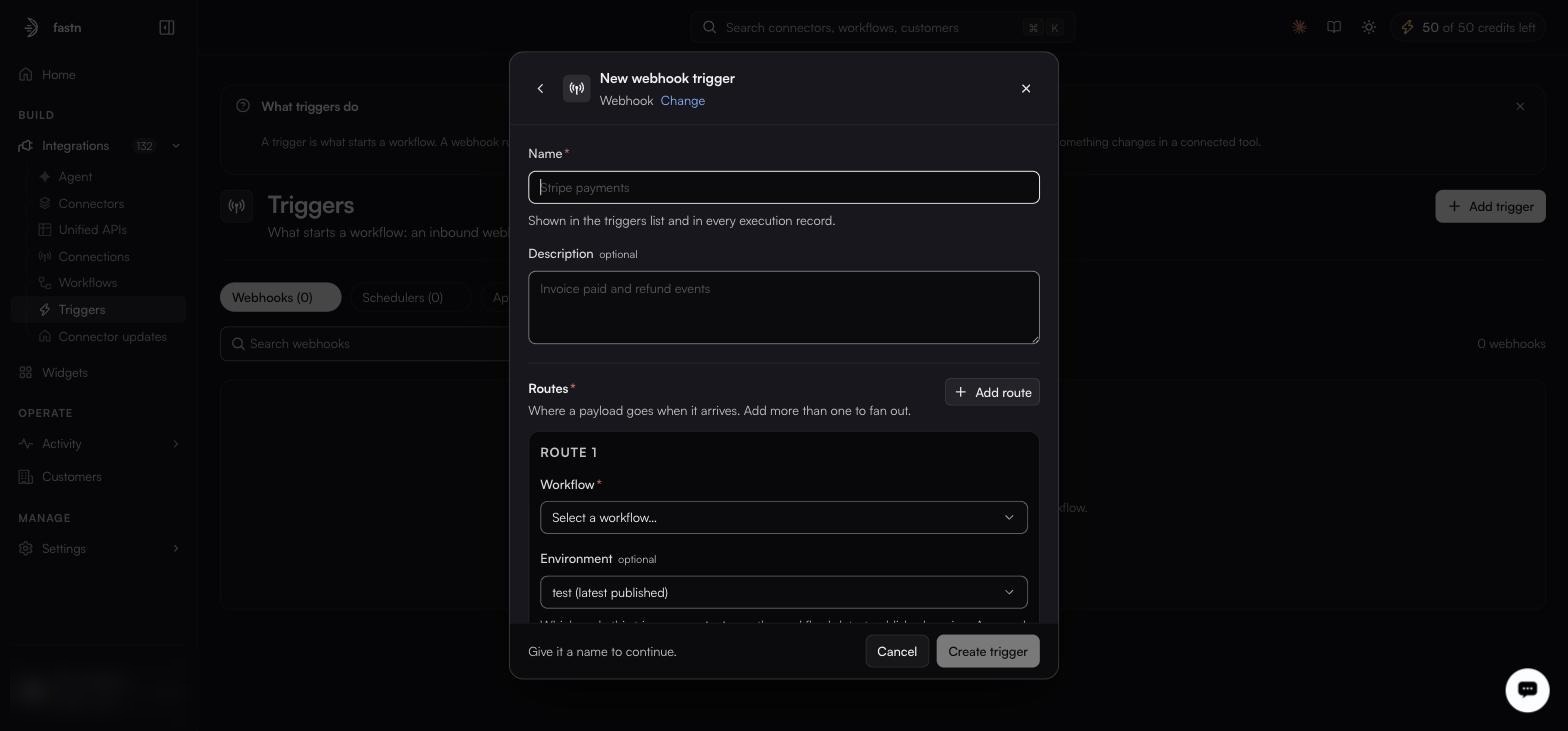
#### Name it
From **Add trigger**, choose **Webhook**.
Routes are required, a webhook with none has nowhere to send its payload.
| Field | Notes |
| --------------- | ---------------------------------------------------------- |
| **Name** | Required. Shown in the list and on every execution record. |
| **Description** | Optional. |
| {% endstep %} | |
{% step %}
#### Add at least one route
A route says where a payload goes when it arrives. Routes are required. Add more with **Add route** to fan a single inbound call out to several workflows.
| Field | Notes |
| --------------- | -------------------------------------------------------------------------------------------------------------------------------------------------------------------------------------------------------------------------------------------------------------------------------------------------------------------------------------------- |
| **Workflow** | Required. Which workflow this route runs. |
| **Environment** | Optional. `test (latest published)` runs the workflow's latest published version. **Any other option is one of your org's named environments** (see [Environments](/manage/environments.md)) and runs the version deployed there, and **if nothing is deployed there, the fire fails**. Every org starts with one named environment, `Live`. |
| **Headers** | Optional key/value pairs sent with the request to the workflow. Use for a key the workflow needs to call back to the sender. |
| {% endstep %} | |
{% step %}
#### Set delivery attempts
How many times in total fastn tries to deliver an event to the workflow, counting the first try. Once the attempts are exhausted the delivery is recorded as failed, and you replay it from [Activity → Events](/operate/events.md), where every row carries a **Replay** action.
{% hint style="warning" %}
**Finding the failed one is the hard part.** Events filters by source (`All`, `Webhook`, `Scheduled`, `Manual`) and has **no status filter**, so on a busy org you cannot list failures directly. Search Events by the trigger's name and look for a row whose status is not `Delivered`. The create-trigger form calls this destination *Failed deliveries*; there is no view by that name: Activity → Events is where the events actually are.
{% endhint %}
| Field | Range / options | Default |
| -------------------- | ---------------------------------------------- | ----------- |
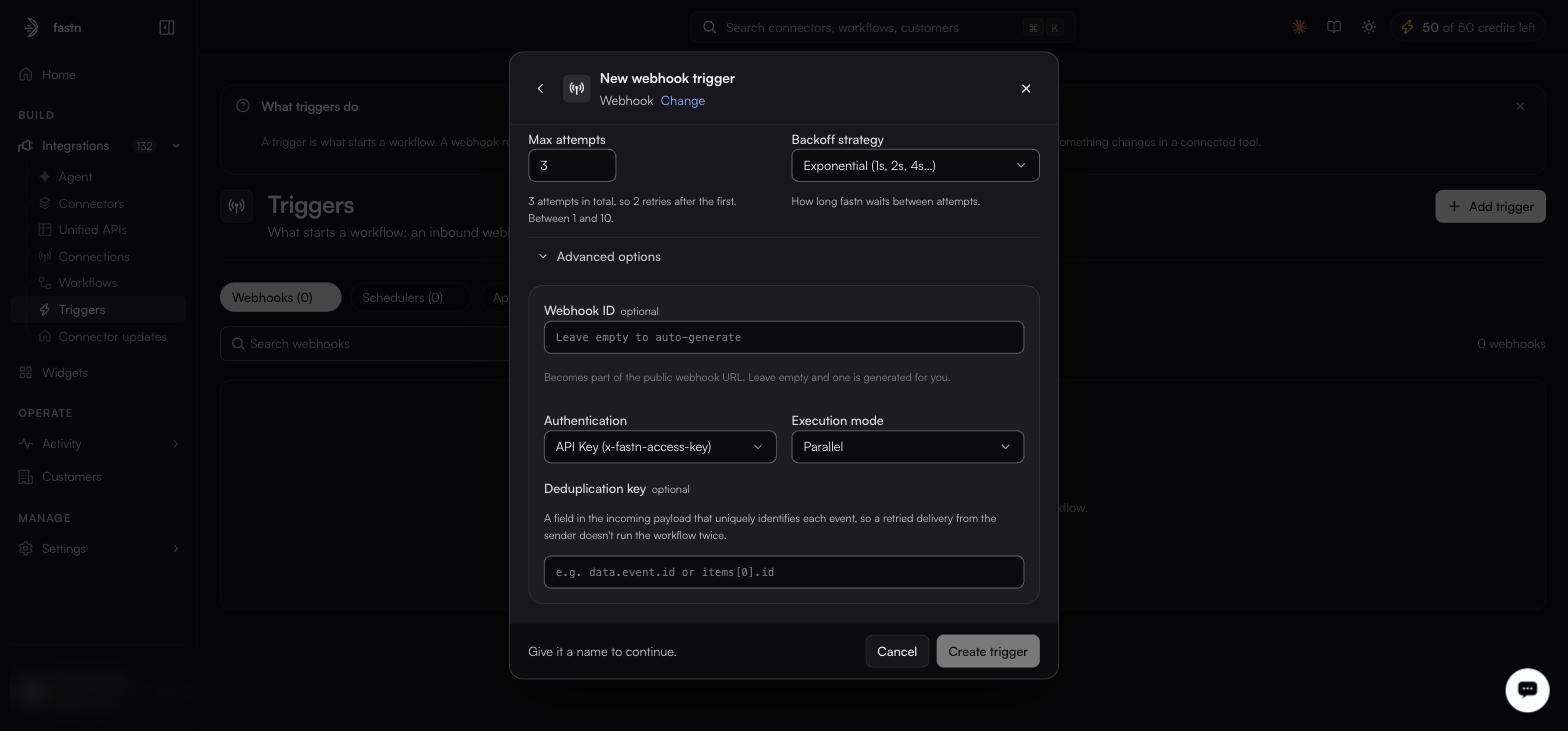
| **Max attempts** | 1–10. `1` means try once and never retry. | 3 |
| **Backoff strategy** | `Exponential (1s, 2s, 4s…)`, `Linear`, `Fixed` | Exponential |
| {% endstep %} | | |
{% step %}
#### Set the advanced options, if you need them
Advanced options start collapsed; the defaults shown here suit most senders.
| Field | Notes |
| --------------------- | ----------------------------------------------------------------------------------------------------------------------------------------------------- |
| **Webhook ID** | Optional. Becomes part of the public webhook URL. Leave empty and one is generated. |
| **Authentication** | **API Key (x-fastn-access-key)**, the default (callers must send the header. **None (public)**), anyone with the URL can fire it. |
| **Execution mode** | **Parallel**, the default (concurrent events run concurrently. **Sequential**), one at a time, in arrival order. |
| **Deduplication key** | Optional. A field in the incoming payload that uniquely identifies each event, so a retried delivery from the sender does not run the workflow twice. |
| {% endstep %} | |
{% step %}
#### Create it, then hand out the URL
Select **Create trigger** (there is no Save button) and it joins the **Webhooks** list. Its row menu offers **Copy URL**, **Copy as cURL**, **Disable**, **Edit** and **Delete**: **Copy as cURL** is the fastest way to fire one by hand while you are debugging.
{% endstep %}
{% endstepper %}
{% hint style="danger" %}
Only use **None (public)** when the sender genuinely cannot set a header, and pair it with a deduplication key and a workflow that validates its own payload.
{% endhint %}
{% hint style="success" %}
Sequential mode plus a deduplication key is the combination that makes a webhook-driven sync idempotent. Worth setting up front rather than after the first duplicate-record incident.
{% endhint %}
---
# Agent Instructions
This documentation is published with GitBook. GitBook is the documentation platform designed so that both humans and AI agents can read, navigate, and reason over technical content effectively. Learn more at gitbook.com.
## Querying This Documentation
If you need additional information that is not directly available in this page, you can query the documentation by asking a question.
Perform an HTTP GET request on the following URL with the `ask` and `goal` query parameters:
```
GET https://docs.fastn.ai/build/triggers/webhooks.md?ask=&goal=
```
`ask` is the immediate question: it should be specific, self-contained, and written in natural language.
`goal` is what the user is ultimately trying to achieve, the reason they need the answer. Sharing it helps GitBook give you a better, more relevant answer. A goal is most helpful when it describes the outcome the user wants rather than restating the question. For example, with `ask=how do I create an API token`, a goal like `automate deployments from our CI pipeline` lets GitBook tailor the answer to that use case.
The response will contain a direct answer to the question and relevant excerpts and sources from the documentation.
Use this mechanism when the answer is not explicitly present in the current page, you need clarification or additional context, or you want to retrieve related documentation sections.