> For the complete documentation index, see [llms.txt](https://docs.fastn.ai/llms.txt). Markdown versions of documentation pages are available by appending `.md` to page URLs; this page is available as [Markdown](https://docs.fastn.ai/build/triggers/app-events.md).
# App event triggers
A trigger that fires when something changes in a connected system.
An app event trigger fires when something changes in a connected system: a HubSpot deal moves, a GitHub PR merges.
**Columns:** `Name`, `Tenant`, `Connector`, `Type`, `Events`, `Status`, `Subscription`, `Routes`, `Created`, `Actions`.
**`Subscription` is the column that matters on this page.** It reads `Subscribed` or `Failed`, and it is separate from `Status`: a trigger can be `Active` and still never fire, because *Status* is whether you have enabled it and *Subscription* is whether fastn successfully registered for events with the provider. Watch this one.
The row menu holds five items: **Copy ingest URL**, **Edit**, **Disable**, **Retry Subscription** and **Delete**.
### Create an app event trigger
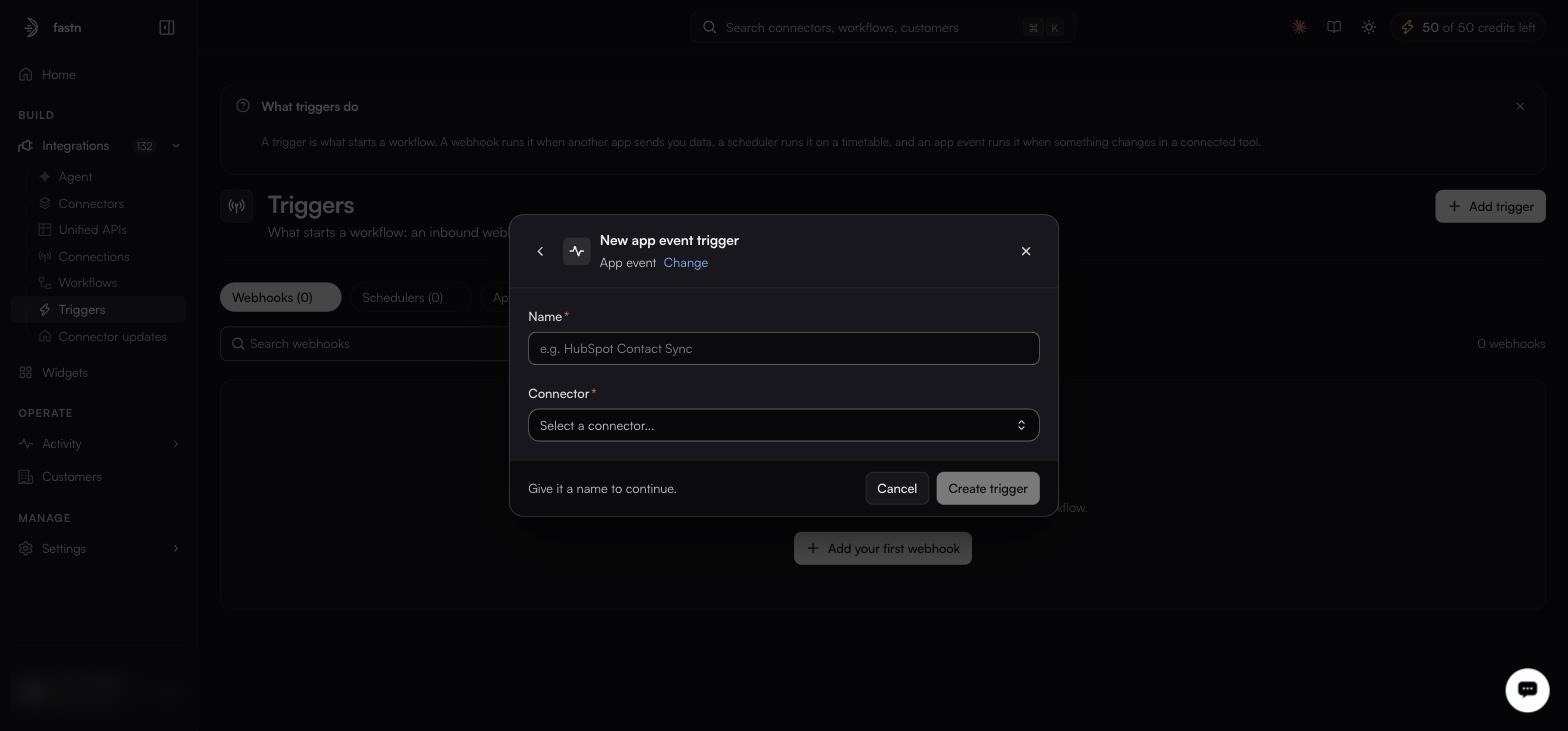
The form is progressive: each answer reveals the next question. Five answers in all (name, connector, connection, event, routes), with a gate between the connector and the connection if nothing is connected yet.
{% stepper %}
{% step %}
#### Name it
From **Add trigger**, choose **App event**, and give it a **Name** (required).
The connector cannot be changed after the trigger is created, choose it deliberately.
{% endstep %}
{% step %}
#### Choose the connector
**Connector** is required, searchable, and **immutable after the trigger is created**: choose carefully, because you cannot change it later.
{% endstep %}
{% step %}
#### Clear the connection gate
Without a live connection for that connector the form stops here: *No active connection found for this connector. Connect first to use it as a trigger source.* Make the [connection](/build/connections.md) first, then continue.
{% endstep %}
{% step %}
#### Pick the connection
**Connection** is required, which authorised link this trigger listens on.
{% endstep %}
{% step %}
#### Pick the event
**Event** is required: a radio list with **Search events...**, a `WEBHOOK` badge, a `Registered` or `Not Subscribed` state, the raw event key, and a **Payload Schema** expander so you can see what will arrive.
{% endstep %}
{% step %}
#### Add routes
**Routes** are required, and the same shape as a webhook's, minus the JSON payload field.
{% endstep %}
{% step %}
#### Create it, then check Subscription
Select **Create trigger** (there is no Save button) and it joins the **App events** list.
**Do not walk away at this point.** Creating the trigger asks fastn to register for events with the provider, and that registration can fail on its own, after the form has closed successfully. Look at the new row's `Subscription` column before you consider the job done.
{% endstep %}
{% endstepper %}
{% hint style="danger" %}
**`Active` with `Subscription: Failed` means the trigger will never fire.** fastn could not register for events with the provider, so nothing will ever arrive, and because `Status` still reads `Active`, the list looks healthy at a glance.
Recover with **Retry Subscription** from the row menu. If it fails again, the problem is upstream of the trigger: re-check the [connection](/build/connections.md) is still live and that its credential still carries the scopes the event needs.
{% endhint %}
App events are the cleanest option when the connector supports them: no URL to hand out, no polling, and fastn manages the subscription with the upstream provider on your behalf. That management is the trade: you gain a subscription you did not have to build, and you take on a failure mode the other two trigger types do not have.
---
# Agent Instructions
This documentation is published with GitBook. GitBook is the documentation platform designed so that both humans and AI agents can read, navigate, and reason over technical content effectively. Learn more at gitbook.com.
## Querying This Documentation
If you need additional information that is not directly available in this page, you can query the documentation by asking a question.
Perform an HTTP GET request on the following URL with the `ask` and `goal` query parameters:
```
GET https://docs.fastn.ai/build/triggers/app-events.md?ask=&goal=
```
`ask` is the immediate question: it should be specific, self-contained, and written in natural language.
`goal` is what the user is ultimately trying to achieve, the reason they need the answer. Sharing it helps GitBook give you a better, more relevant answer. A goal is most helpful when it describes the outcome the user wants rather than restating the question. For example, with `ask=how do I create an API token`, a goal like `automate deployments from our CI pipeline` lets GitBook tailor the answer to that use case.
The response will contain a direct answer to the question and relevant excerpts and sources from the documentation.
Use this mechanism when the answer is not explicitly present in the current page, you need clarification or additional context, or you want to retrieve related documentation sections.