> For the complete documentation index, see [llms.txt](https://docs.fastn.ai/llms.txt). Markdown versions of documentation pages are available by appending `.md` to page URLs; this page is available as [Markdown](https://docs.fastn.ai/build/connections/creating-a-connection.md).

# Creating a connection

Making a connection yourself with New connection: the system picker, key-based methods, OAuth with providers and scopes, and when to use it.

**New connection** on the Connections page connects an app for **your organisation**. Use it for accounts your organisation owns, such as your own Slack workspace or data warehouse, which your workflows then use. It is also the quickest way to test a connector end to end.

Your **customers'** connections should not be made here. Customers connect their own accounts through the [widget](/embed/embed.md) you embed, which keeps their credentials theirs.

### 1. Pick the system

**New connection** opens **Connect a system** · *Pick the system your customers use. You can add more later.*

<figure><img src="https://1255842839-files.gitbook.io/~/files/v0/b/gitbook-x-prod.appspot.com/o/spaces%2F3iSr2Tx8FvvuoLPncziH%2Fuploads%2Fgit-blob-ef8d602d825989290828fc106492b3e99bebce4f%2Fconnections-new-picker.webp?alt=media" alt="The Connect a system dialog with a Search systems box and a grid of systems, each showing its name and the label of its default auth method, such as AbstractAPI Holidays API Key, Airtable OAuth 2.0, Akeneo PIM Akeneo Credentials and Asana Connect with Asana OAuth, with the count 422 of 422 systems and a Cancel button"><figcaption><p>Every connector in the catalogue, with the label of its default auth method.</p></figcaption></figure>

Type in **Search systems** to narrow the grid, then click the system. The footer counts how many systems match. The list can take a few seconds to load (*Loading systems...*).

### 2. Give the credential

The dialog changes to **Connect \<system>**, tagged with the selected auth method. **←** goes back to the picker.

#### Keys and tokens

For API key, bearer token, basic auth and custom methods, the dialog shows the fields the connector asks for. The placeholder usually says where to find the value.

<figure><img src="https://1255842839-files.gitbook.io/~/files/v0/b/gitbook-x-prod.appspot.com/o/spaces%2F3iSr2Tx8FvvuoLPncziH%2Fuploads%2Fgit-blob-9f3f528ac863c8e61b4d2aeb3a3e5c5589f687c2%2Fconnections-connect-apikey.webp?alt=media" alt="The Connect AbstractAPI Holidays dialog, tagged API Key, with one API Key field and Cancel and Connect buttons"><figcaption><p>An API key method.</p></figcaption></figure>

Fill them in and click **Connect**.

#### Connecting with OAuth

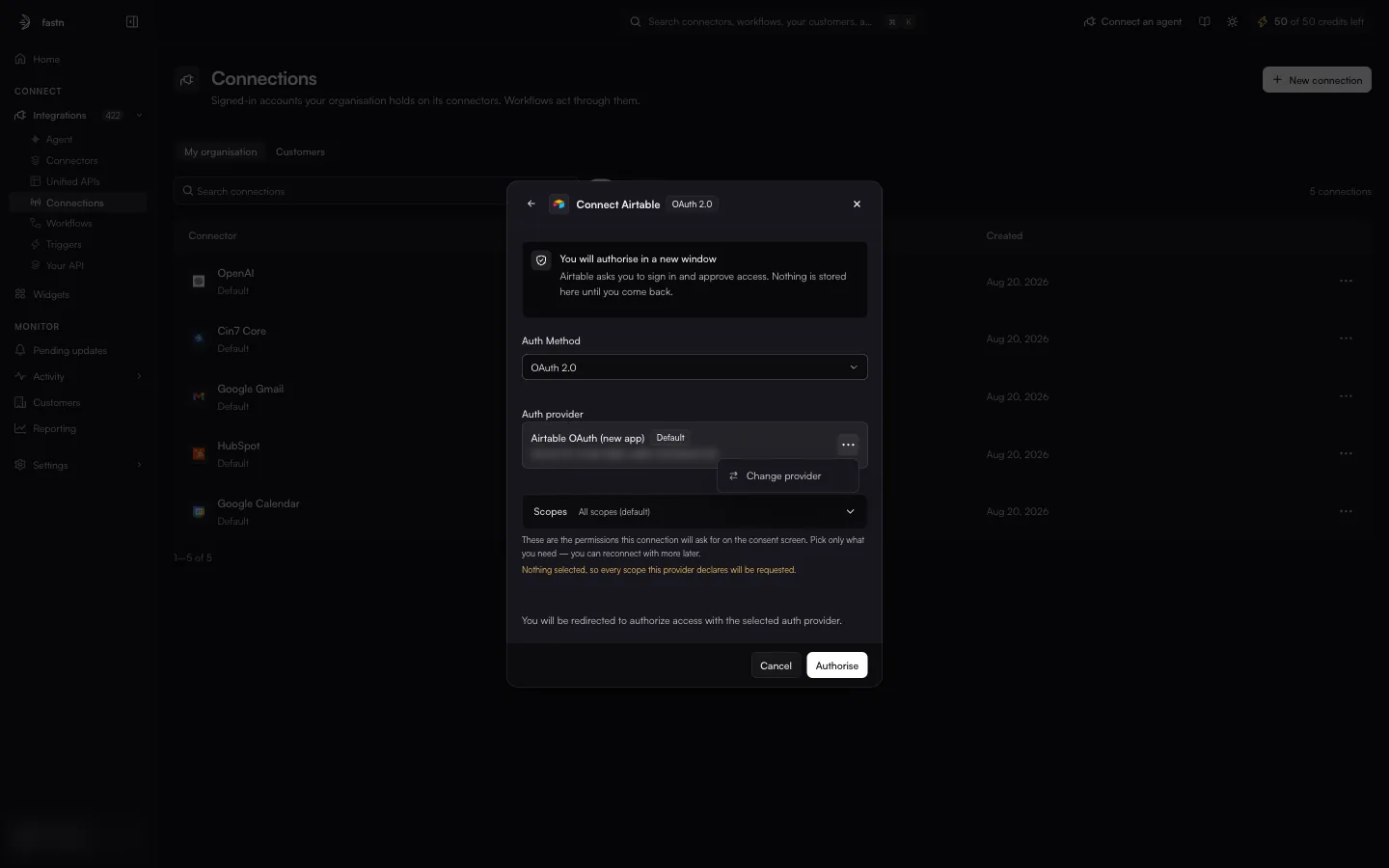
<figure><img src="https://1255842839-files.gitbook.io/~/files/v0/b/gitbook-x-prod.appspot.com/o/spaces%2F3iSr2Tx8FvvuoLPncziH%2Fuploads%2Fgit-blob-834200aa4e39738e84216fa8d056cfeb43f5332c%2Fconnections-connect-oauth-provider.webp?alt=media" alt="The Connect Airtable dialog, tagged OAuth 2.0: You will authorise in a new window, Airtable asks you to sign in and approve access. Nothing is stored here until you come back. An Auth Method selector set to OAuth 2.0, an Auth provider card Airtable OAuth (new app) marked Default with a blurred client ID and a three-dot menu, a Scopes selector reading All scopes (default), and Cancel and Authorise buttons"><figcaption><p>OAuth: the dialog shows the provider and the scopes it will request.</p></figcaption></figure>

| Part              | Meaning                                                                                                                                                                                                                                        |
| ----------------- | ---------------------------------------------------------------------------------------------------------------------------------------------------------------------------------------------------------------------------------------------- |
| **Auth Method**   | Shown when the connector offers more than one method. Starts on the default.                                                                                                                                                                   |
| **Auth provider** | The OAuth app that sends you to the consent screen. **Default** marks the connector's preferred provider. If there are several, **⋯ → Change provider** picks another. See [Auth methods and providers](/build/connectors/auth-methods.md).    |
| **Scopes**        | *These are the permissions this connection will ask for on the consent screen. Pick only what you need — you can reconnect with more later.* With nothing selected (**All scopes (default)**), every scope the provider declares is requested. |

<figure><img src="https://1255842839-files.gitbook.io/~/files/v0/b/gitbook-x-prod.appspot.com/o/spaces%2F3iSr2Tx8FvvuoLPncziH%2Fuploads%2Fgit-blob-4139c896e0dcfaf3625385c18393c2bc5af158ca%2Fconnections-change-provider.webp?alt=media" alt="The Connect Airtable dialog with the provider&#x27;s three-dot menu open, showing Change provider"><figcaption><p><strong>Change provider</strong> on the provider card.</p></figcaption></figure>

Click **Authorise**. A new window opens on the app's sign-in and consent page. Sign in, approve access, and the window returns to fastn. *Nothing is stored here until you come back.*

#### Switching method

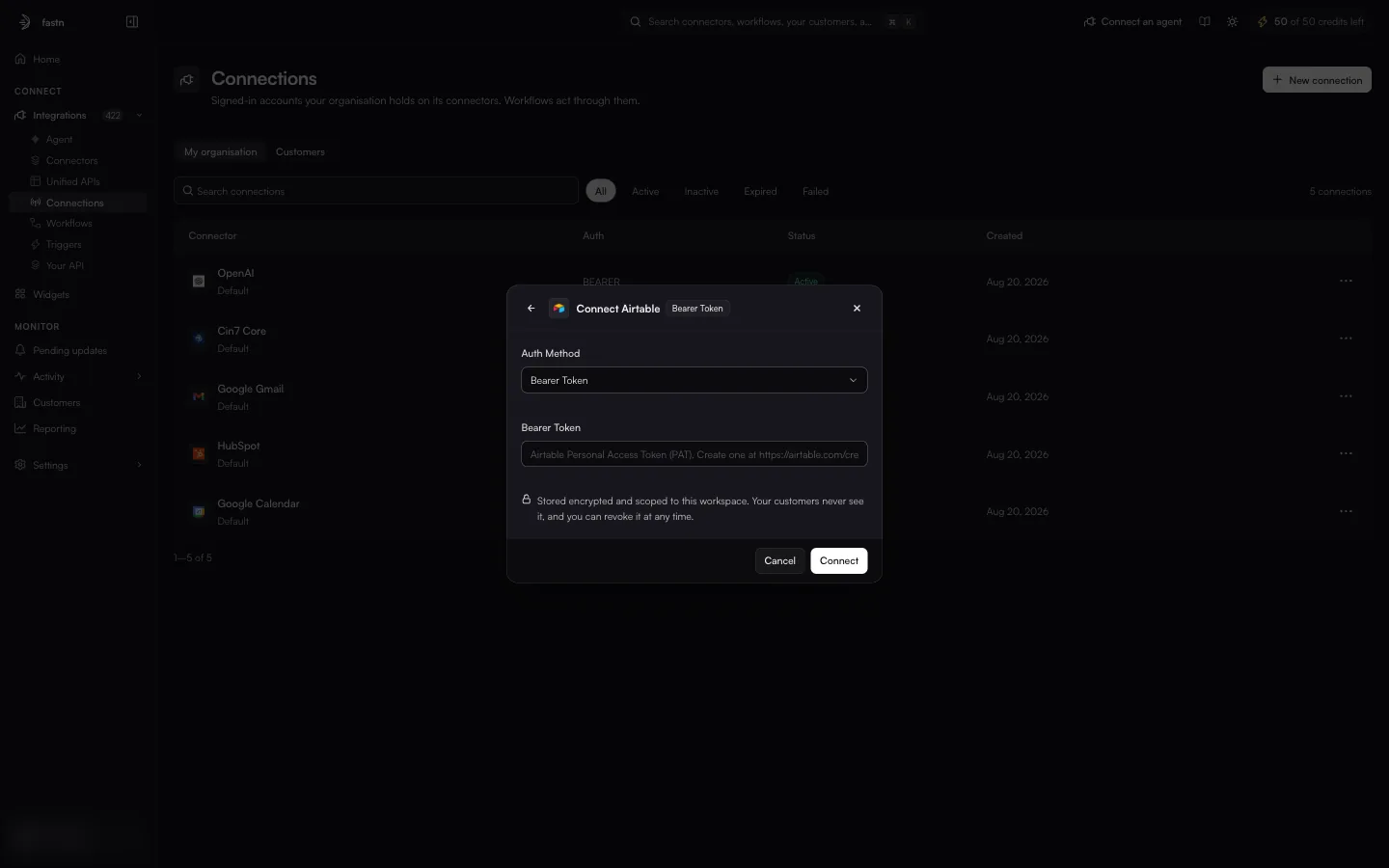
If the connector offers more than one method, changing **Auth Method** changes the form. For example, Airtable's **Bearer Token** method replaces the OAuth sign-in with a single **Bearer Token** field.

<figure><img src="https://1255842839-files.gitbook.io/~/files/v0/b/gitbook-x-prod.appspot.com/o/spaces%2F3iSr2Tx8FvvuoLPncziH%2Fuploads%2Fgit-blob-8f0c24b6d097226036de4d1f211c15bb88afa8ca%2Fconnections-connect-bearer.webp?alt=media" alt="The Connect Airtable dialog, tagged Bearer Token, with the Auth Method selector set to Bearer Token, a Bearer Token field whose placeholder asks for an Airtable Personal Access Token, and Cancel and Connect buttons"><figcaption><p>The same connector with its Bearer Token method selected.</p></figcaption></figure>

### 3. Check the result

The new connection appears in the **My organisation** view and on the connector's **Connections** tab with the status `Active`.

{% hint style="info" %}
Every credential is *Stored encrypted and scoped to this workspace. Your customers never see it, and you can revoke it at any time.* To revoke it, open the connection and click **Disconnect**.
{% endhint %}


---

# Agent Instructions
This documentation is published with GitBook. GitBook is the documentation platform designed so that both humans and AI agents can read, navigate, and reason over technical content effectively. Learn more at gitbook.com.

## Querying This Documentation
If you need additional information that is not directly available in this page, you can query the documentation by asking a question.

Perform an HTTP GET request on the following URL with the `ask` and `goal` query parameters:

```
GET https://docs.fastn.ai/build/connections/creating-a-connection.md?ask=<question>&goal=<user_goal>
```

`ask` is the immediate question: it should be specific, self-contained, and written in natural language.
`goal` is what the user is ultimately trying to achieve, the reason they need the answer. Sharing it helps GitBook give you a better, more relevant answer. A goal is most helpful when it describes the outcome the user wants rather than restating the question. For example, with `ask=how do I create an API token`, a goal like `automate deployments from our CI pipeline` lets GitBook tailor the answer to that use case.

The response will contain a direct answer to the question and relevant excerpts and sources from the documentation.

Use this mechanism when the answer is not explicitly present in the current page, you need clarification or additional context, or you want to retrieve related documentation sections.