> For the complete documentation index, see [llms.txt](https://docs.fastn.ai/llms.txt). Markdown versions of documentation pages are available by appending `.md` to page URLs; this page is available as [Markdown](https://docs.fastn.ai/build/agent/approval-mode.md).
# Approval mode
How far the agent goes without checking in: Auto versus Manual.
The chip under the message box decides how far the agent goes without checking in.
| Mode | Behaviour |
| -------- | ---------------------------------------------------------------------- |
| **Auto** | The default. Does not ask. Fastest for exploration. |
| Manual | Asks before any create, update or delete. Use when touching live data. |
You can change it mid-session. Switching to **Auto** after a few approvals is a common pattern: watch what the agent reaches for while it is unfamiliar, then let it run.
### The approval gate
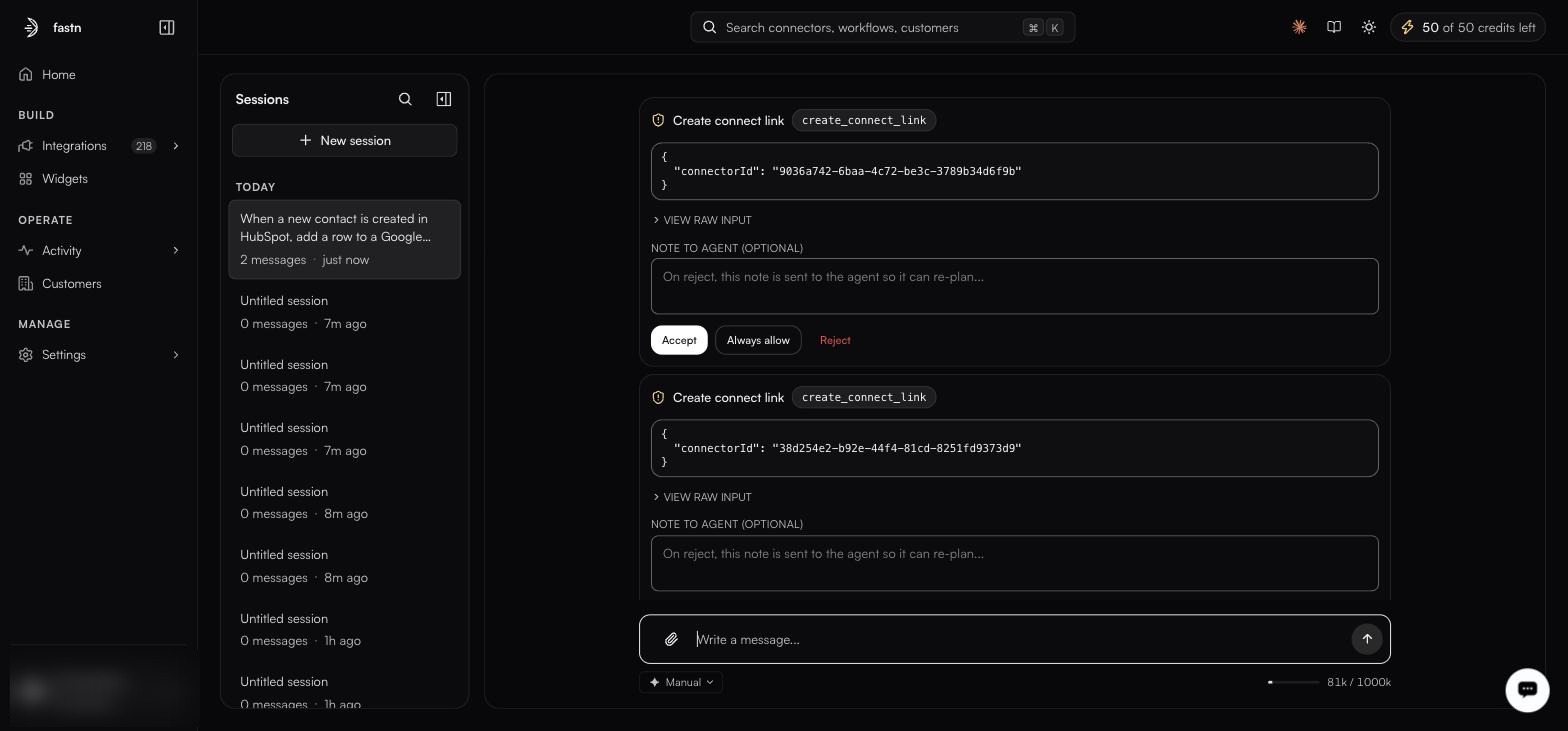
In **Manual** mode the agent stops and posts a card for each pending call. Nothing happens until you answer it.
One card per pending call. Each shows the exact tool name and the exact arguments.
Every card carries the same parts:
| Part | What it shows |
| ---------------------------- | --------------------------------------------------------------------------- |
| Title | The action in plain language, e.g. **Create connect link** |
| Tool badge | The literal tool being invoked, e.g. `create_connect_link` |
| Payload | The exact JSON arguments, such as the `connectorId` it will act on |
| **VIEW RAW INPUT** | Expands the full, untruncated payload |
| **NOTE TO AGENT (OPTIONAL)** | Free text: *"On reject, this note is sent to the agent so it can re-plan…"* |
### The three responses
* **Accept**: runs this one call, and only this one. The next call gates again.
* **Always allow**: stops asking for *that tool* for the remainder of the session. Useful once you have seen a read-only call a few times; think harder before using it on a tool that writes.
* **Reject**: refuses the call. Whatever you typed in the note goes back to the agent, which re-plans around it.
{% hint style="info" %}
The note is what makes rejection useful. *"Use the sandbox sheet, not the production one"* produces a corrected plan. A bare **Reject** with no explanation usually produces the same call again.
{% endhint %}
{% hint style="warning" %}
**Always allow** is scoped to the session, not to the tool forever, but within a long session it can cover a lot of ground. If the agent is about to touch production data, leave the gate in place.
{% endhint %}
See [the worked example](/build/agent/worked-example.md) for a gate in the middle of a real build.
---
# Agent Instructions
This documentation is published with GitBook. GitBook is the documentation platform designed so that both humans and AI agents can read, navigate, and reason over technical content effectively. Learn more at gitbook.com.
## Querying This Documentation
If you need additional information that is not directly available in this page, you can query the documentation by asking a question.
Perform an HTTP GET request on the following URL with the `ask` and `goal` query parameters:
```
GET https://docs.fastn.ai/build/agent/approval-mode.md?ask=&goal=
```
`ask` is the immediate question: it should be specific, self-contained, and written in natural language.
`goal` is what the user is ultimately trying to achieve, the reason they need the answer. Sharing it helps GitBook give you a better, more relevant answer. A goal is most helpful when it describes the outcome the user wants rather than restating the question. For example, with `ask=how do I create an API token`, a goal like `automate deployments from our CI pipeline` lets GitBook tailor the answer to that use case.
The response will contain a direct answer to the question and relevant excerpts and sources from the documentation.
Use this mechanism when the answer is not explicitly present in the current page, you need clarification or additional context, or you want to retrieve related documentation sections.