# Connect UCL to Cursor and access data from Notion
### **Connect your Notion account to UCL**
* You need to authenticate your Notion account, after which the Notion App will appear as **Connected**.
* From **Select Tools**, you can enable all or any specific **Actions**.
### **Connect Cursor to UCL**
* Download and install the latest version of [Cursor](https://cursor.com) on your desktop.
* Open Cursor and navigate to **Settings** in the top-right corner.
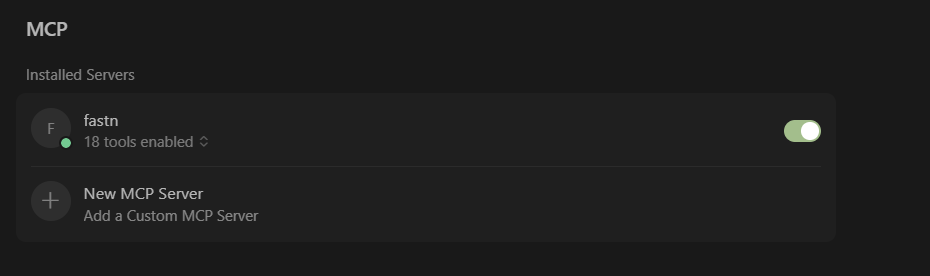
* Next, in the **MCP** section, click **Add Custom MCP**; this opens a file named `mcp.json`.
{% embed url="" %}
* From your UCL dashboard, you can navigate to the **Embed** section from the top navigation bar and select **Cursor** from the list of clients available to access the step-by-step embedding guide for Cursor with UCL.
{% hint style="info" %}
You can select and follow the guide for any client of your choice from the embed page to integrate it with UCL.
{% endhint %}
* In the **Open Setting and Add MCP Server** step, you will see the Cursor command code, which you can copy for your workspace and paste it into Cursor.
{% hint style="info" %}
Checking the **Multi Tenant** option will enable you to embed connectors and actions for multiple users \[users].
{% endhint %}
```json
{
"mcpServers": {
"fastn": {
"transport": "streamable_http",
"url": "https://mcp.ucl.dev/shttp/space_id={}&tenant_id=test-tenant&auth_token=customAuthToken"
}
}
}
```
* Paste this configuration into the `mcp.json` file in Cursor and **save** it.
{% embed url="" %}
* You should now see the UCL Server listed as connected in Cursor. Under the tools label in Cursor, you can view all the enabled actions available with your connectors in UCL.
### **Use Cursor to Fetch Meeting Summary from Notion**
* In Cursor, click **Toggle AI Pane** from the top-right corner to open the assistant.
{% hint style="info" %}
Make sure you’ve selected an **agent;** it's not auto-set.
{% endhint %}
* In the assistant, it will ask for your Notion database ID after you have given a command like:
```
Fetch summary from Notion for the meeting titled "Meeting Name"
```
* The assistant will use the **"Get Tasks"** or a relevant action to retrieve notes.
* The meeting summary should appear directly in your AI plane, ready for review or further processing.
{% embed url="" %}
---
# Agent Instructions: Querying This Documentation
If you need additional information that is not directly available in this page, you can query the documentation dynamically by asking a question.
Perform an HTTP GET request on the current page URL with the `ask` query parameter:
```
GET https://docs.fastn.ai/ai-agent-integrations-ucl/getting-started/how-ucl-works-in-real-scenarios/connect-ucl-to-cursor-and-access-data-from-notion.md?ask=
```
The question should be specific, self-contained, and written in natural language.
The response will contain a direct answer to the question and relevant excerpts and sources from the documentation.
Use this mechanism when the answer is not explicitly present in the current page, you need clarification or additional context, or you want to retrieve related documentation sections.